
On this page
Payroll and timekeeping software combines a time clock with payroll in one system, so the hours a remote hourly team punches flow straight into their paychecks. Eight tools do it best, with published starting prices currently from $4 to $8 an employee a month plus base fees from $5 to $50 a month: Deputy, OnTheClock, Connecteam and TimeTrex lead from the time clock, while QuickBooks Payroll, Gusto, Rippling and Paychex lead from payroll and attach timekeeping.
The eight tools compared
| Tool | Best for | Starting price (USD) | Timekeeping |
|---|---|---|---|
| Deputy | Shift-based hourly teams | $5 a user a month (Lite tier) | Native payroll add-on (Deputy Payroll, run on Paycor) |
| OnTheClock | Small teams on a budget | $4 an employee a month plus a $5 base | Native payroll add-on |
| Connecteam | Deskless and field teams | Free to 10 users, then $29 a month billed yearly | GPS clock-in with payroll integrations |
| TimeTrex | One system for time and pay | Calculator pricing | Native payroll in every edition |
| QuickBooks Payroll | Teams already on QuickBooks | $50 a month plus $7 an employee | Time app included with Premium and Elite |
| Gusto | Payroll first, time later | $49 a month plus $6 a person | Time and attendance add-on |
| Rippling | Companies adding apps as they grow | $8 an employee a month, base fee unpublished | Separate time product, priced on quote |
| Paychex | Full-service payroll with support | Quote only | Sold as a separate solution |
The criteria behind this payroll and timekeeping software comparison are whether timekeeping is native or an add-on, the combined published price, how hours reach payroll, and multi-state fit. The recordkeeping rules that make a time clock non-optional for hourly staff are covered below the entries.
Timekeeping tools with payroll
These four lead with the time clock: scheduling, clock-ins and timesheets come first, and payroll is either a native add-on or built in, so hours reach pay runs without a spreadsheet in between. They suit teams whose staff are paid by the hour and whose main recordkeeping risk is missing or edited punches; if you only need hours exported rather than payroll run, plain time tracking tools for remote employees cover that job.
Deputy
Best for: shift-based hourly teams that plan rosters and want the same hours to run payroll
Deputy is a scheduling and time platform: it builds rosters, records clock-ins and timesheets, and, on its Core and Pro tiers, adds auto-scheduling and labor forecasting. That makes it the closest fit of the eight for teams whose payroll cost is driven by shift patterns rather than headcount alone.
Deputy’s scheduling and time plans currently cost $5 a user a month (Lite), $6.50 (Core) or $9 (Pro), with 10% off for annual billing and a $30 minimum monthly spend on monthly plans, per its pricing page. Deputy Payroll, run on Paycor, adds $8 a user a month plus a $49 monthly base, and is available on annual Core and Pro plans in the US only.
Pros
- Scheduling, timesheets and payroll in one platform
- Auto-scheduling and forecasting from the Core tier up
- Annual billing saves 10% on the time and scheduling plans
Cons
- Payroll requires an annual Core or Pro plan, US only
- The $49 payroll base fee stacks on top of per-user pricing
- SMS charges apply on top of plan prices
OnTheClock
Best for: small hourly teams that want the cheapest published combined price
OnTheClock covers time tracking, scheduling and PTO tracking, and its payroll add-on runs pay runs inside the same account, which is why it works for teams that want hours and pay handled without a second vendor. It also integrates with Gusto, QuickBooks, ADP and Paychex if you keep payroll separate.
Time tracking currently costs $4 an employee a month plus a $5 base, and the payroll add-on costs $6 an employee a month plus a $40 base, with a required one-time $250 payroll migration fee, on its pricing page. The page’s own calculator shows $65 a month at 2 employees with payroll; at 10 employees the same published prices add to $145 a month.
Pros
- Lowest published combined price of the eight
- Runs payroll natively or exports to Gusto, QuickBooks, ADP or Paychex
- 30-day free trial with no credit card required
Cons
- The $250 payroll migration fee is required, not optional
- Payroll stacks its own $40 base on the $5 time base
- Enterprise pricing for more than 100 employees is unpublished
Connecteam
Best for: deskless and field teams that clock in from a phone
Connecteam is an operations app for non-desk staff: its time clock runs on employees’ phones with real-time GPS stamping, and payroll integration is included from the Operations Hub Basic tier. Its Small Business plan is free for life for up to 10 users, though payroll integration is not included on that tier.
Operations Hub currently costs $29 a month billed yearly or $35 billed monthly (Basic) for the first 30 users, then $0.80 to $1 per extra user, with Advanced at $49/$59 and Expert at $99/$119, per its pricing page. Connecteam does not run payroll itself: approved timesheets flow to the payroll provider it integrates with, so the combined bill depends on that provider.
Pros
- Free for life for up to 10 users
- GPS-stamped clock-in from the cheapest paid tier
- Yearly billing saves 18%
Cons
- No native payroll, so total cost depends on the payroll provider you pair it with
- Over 30 users, per-user add-ons change the bill each time headcount moves
- Payroll integration is not part of the free tier
TimeTrex
Best for: teams that want time and payroll in one product at every tier
TimeTrex bundles time and attendance tracking, employee scheduling, leave management and payroll in every edition, so hours recorded in its time clock flow directly into its own payroll engine. Professional, Corporate and Enterprise editions differ in extras like job costing and expense management, not in whether payroll is included.
TimeTrex publishes no dollar figures on its pricing page: prices come from an employee-count calculator, new accounts may be charged an activation fee, and plans carry a minimum 1-year term commitment.
Pros
- Time, scheduling, leave and payroll in one product at every edition
- 30-day free trial
Cons
- No published prices to compare against the others before talking to sales
- Minimum 1-year term commitment
- Possible account activation fee, and extra fees for biometric timeclocks
Payroll platforms with timekeeping
These four lead with payroll: tax filings, direct deposits and state registrations are the core product, and timekeeping is either included with a higher tier, an add-on or a separate product. They suit teams that think in pay runs first and want the time clock to feed a payroll platform that already handles their state registrations.
QuickBooks Payroll
Best for: companies whose books and accountant already live in Intuit’s ecosystem
QuickBooks Payroll runs payroll inside the QuickBooks ecosystem, so it fits teams whose accountant and books already live there. The QuickBooks Time app, which handles clock-ins, schedules and a who’s-working view, is included with the Premium and Elite plans; the base Workforce Payroll plan pairs with QuickBooks Time sold separately, and Elite adds geofencing and mileage tracking.
Workforce Payroll currently costs $50 a month plus $7 an employee, Premium $88 a month plus $13, and Elite $134 a month plus $17, per its pricing page. A Black Friday promotion live when this page was read discounted all three plans 70% for three months, ending November 29, 2026; the standard rates above are the ones that apply after it.
Pros
- Time app included with Premium and Elite, no separate add-on fee
- Runs inside the same ecosystem as QuickBooks books
- No annual contract, cancel anytime
Cons
- Base plan does not include the Time app
- Per-employee fees rise steeply on higher tiers
- Geofencing and mileage tracking only on the most expensive tier
Gusto
Best for: small US teams that want payroll first and time tracking later
Gusto is a payroll platform for US teams, with unlimited pay runs a month on every plan and a Time and Attendance Plus add-on that adds $6 a person a month. The Simple plan runs basic payroll in one state, which matters for remote teams whose staff sit in several states: Gusto’s state tax registration add-on costs $85 a month per state on an annual contract.
Simple currently costs $49 a month plus $6 a person, Plus $80 plus $12, and Premium $180 plus $22, per its pricing page, with Time and Attendance Plus available even on the Simple plan. At a 10-person team, Simple plus the time add-on currently adds to $169 a month.
Pros
- Time and attendance add-on available from the cheapest plan
- Unlimited pay runs each month
- State tax registration handled as an add-on in supported states
Cons
- $85 a month per state for state tax registration, on an annual contract
- Per-person prices more than triple between the Simple and Premium tiers
- US payroll focus only
Rippling
Best for: companies that want to add apps as they grow
Rippling sells modular products on one employee system, so payroll, time and attendance, benefits and IT accounts start from one directory. That suits a team that expects to add HR products over time, and its time and attendance product is priced on quote like the rest of the modular stack.
Rippling plans start at $8 an employee a month, with a monthly base fee whose amount the page does not publish, per its pricing page. Product-level prices, including time and attendance, are quote-based, so a combined cost can’t be checked before talking to sales.
Pros
- One employee directory across payroll, time, benefits and IT
- Pay only for the products switched on
- Startup program gives eligible US VC-backed startups 6 months free
Cons
- Base fee amount is not published
- Time and attendance priced on quote, not listed
- No combined price to compare against list-price vendors
Paychex
Best for: businesses that want a full-service payroll bureau with hands-on support
Paychex is a full-service payroll provider with four named small-business packages, Basic, Foundations, Advanced and Complete, escalating from essential payroll and HR to a full suite of workforce and talent tools. Time and attendance is sold as a separate solution, not part of any payroll package, so combined pricing is only available through a quote that includes both.
Paychex publishes no list prices; pricing comes through its quote and sales contact process, per its payroll page. A small business can add the separate time and attendance product to any payroll package, priced in the same quote.
Pros
- Named packages from basic payroll to a full HR suite
- Dedicated support structure for small businesses
- Time and attendance available as a companion product
Cons
- No published prices to compare before a sales conversation
- Time and attendance is a separate purchase, not included
- Total cost only visible after requesting a quote
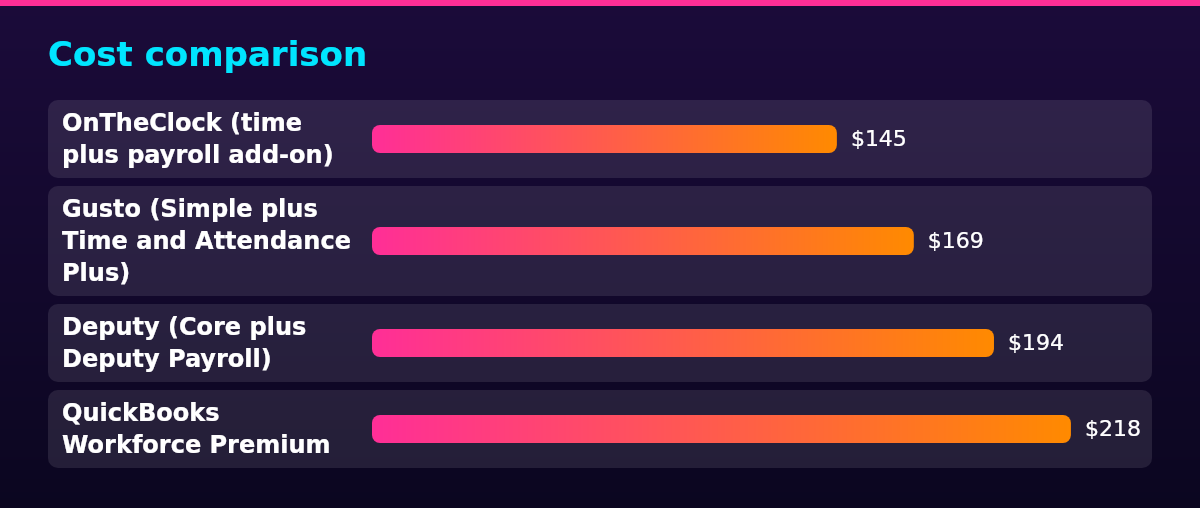
Cost comparison
| Tool at 10 hourly employees | What’s included | Monthly cost (USD) |
|---|---|---|
| OnTheClock (time plus payroll add-on) | Time, scheduling, PTO and payroll | $145 |
| Gusto (Simple plus Time and Attendance Plus) | Payroll and time tracking | $169 |
| Deputy (Core plus Deputy Payroll) | Scheduling, time and payroll | $194 |
| QuickBooks Workforce Premium | Payroll with the Time app | $218 |
Each figure is computed from the published list prices in the entries above, at 10 hourly employees on the cheapest plan that includes both timekeeping and payroll. OnTheClock bills $4 an employee plus a $5 base for time and $6 an employee plus a $40 base for payroll, which is $145 a month, before the one-time $250 migration fee. Gusto’s Simple plan at $49 plus $6 a person is $109, and Time and Attendance Plus at $6 a person adds $60, for $169.
Deputy’s Core tier at $6.50 a user is $65 for 10 users, and Deputy Payroll at $8 a user plus the $49 base adds $129, for $194 on the annual Core plan. QuickBooks Workforce Premium at $88 plus $13 an employee is $218 with the Time app included.
Two bases matter when comparing these numbers. Deputy bills per user, which counts admins and managers with accounts, while OnTheClock, Gusto and QuickBooks bill per employee, so a team with several managers pays more under Deputy than the per-employee tools. Connecteam is left out of the table because it does not run payroll itself: its $29 Operations Hub Basic covers the first 30 users, and the rest of the bill comes from whichever payroll provider it feeds.
TimeTrex, Rippling and Paychex publish no prices that can be checked before talking to sales, calculator pricing, an unpublished base fee and quote-only respectively, so they stay out of the table rather than carrying an estimate.
Timekeeping laws in the US
Federal timekeeping requirements for US employers come from the Fair Labor Standards Act (FLSA): covered employers must keep accurate hours records for every non-exempt worker under the recordkeeping rules at 29 CFR Part 516, wherever that worker clocks in from, and that duty is one of the core employer responsibilities for remote employees. Payroll records must be kept for at least 3 years, and the records wage computations are based on, including time cards and work and time schedules, for at least 2 years, per the Department of Labor’s FLSA recordkeeping summary.
Any timekeeping method is acceptable as long as it is complete and accurate; the Department of Labor’s examples include a time clock, a timekeeper, or workers writing their own times on records. Salaried exempt staff are a different case: the FLSA’s required records are defined for non-exempt workers, so federal law does not require hours records for exempt employees. Some states add their own recordkeeping rules, so check your state’s labor department before turning time tracking off for salaried staff.
In Illinois, a clock-in that scans fingerprints or faces is regulated by the Biometric Information Privacy Act (740 ILCS 14). Before collecting biometric data, an employer must give written notice and receive a written release; it must publish a retention policy and destroy the data when the initial purpose is satisfied or within 3 years of the person’s last interaction, whichever comes first; and employees can recover $1,000 per negligent violation or $5,000 per intentional or reckless violation, plus attorneys’ fees, per the statute text.
For teams spread across states, the time clock’s location stamps do a second job: they tie each workday to a state for withholding and unemployment insurance, which is the core problem in multi-state payroll. A tool that records where each punch happened gives you the audit trail those filings assume.
Scaling framework
Payroll and timekeeping software for growing teams changes with headcount and state count, so the ladder runs from the first hourly hire to the first hire abroad.
- Up to 10 hourly employees, one state: OnTheClock or Connecteam. OnTheClock’s combined time-plus-payroll price is the lowest published figure at this size, and Connecteam’s free tier covers the first 10 users if payroll runs elsewhere.
- Shift-based scheduling driving your labor cost: Deputy. Its rosters, timesheets and payroll add-on keep scheduling and pay in one system, at a higher price once the $49 payroll base and per-user billing stack.
- Multi-state hourly team: QuickBooks Workforce Premium or Gusto. Both publish combined prices, both handle state registrations, and Gusto’s $85 per-state registration add-on is the number to compare against QuickBooks’ plan spread.
- Teams that want one vendor for everything: TimeTrex, Rippling or Paychex. All three sell time and payroll as one vendor relationship, but none publishes a price you can check before a sales conversation, so budget a quote round.
- First hire outside the US: this list covers US payroll, and paying an employee abroad means a different toolkit, where global payroll providers take over.
FAQ
No, not always: some platforms bundle time tracking, some sell it as an add-on, and some sell it separately. QuickBooks includes its Time app on the Premium and Elite plans, Gusto sells Time and Attendance Plus at $6 a person a month, TimeTrex includes payroll and time in every edition, and Paychex sells time and attendance as a separate solution.
Yes, on its Premium and Elite plans, which include the QuickBooks Time app for clock-ins, schedules and a who’s-working view. The base Workforce Payroll plan does not include the Time app; it pairs with QuickBooks Time sold separately.
No single tool wins on every criterion, and the published facts are these: QuickBooks publishes list prices, currently $50 a month plus $7 an employee for Workforce Payroll up to $134 plus $17 for Elite, and includes its Time app on two of three plans. Paychex publishes no list prices, prices every package by quote, and sells time and attendance as a separate solution. Which fits depends on whether you want a published price you can compare, or a quote that comes with hands-on support.
Published prices currently start at $4 an employee a month plus a $5 base, and a 10-person hourly team pays from $145 to $218 a month all-in from the four vendors that publish both sides of the bill. TimeTrex, Rippling and Paychex publish no prices to check, so their cost is only visible in a quote.
Not under federal law: the FLSA’s recordkeeping requirements are defined for non-exempt workers, so salaried exempt staff don’t need hours records federally. Some states add their own recordkeeping rules, so check your state’s labor department before switching exempt staff off the clock.
Timekeeping software records when employees work: clock-ins, breaks, schedules and PTO. Payroll software turns pay rates and hours into paychecks and tax filings. Combined payroll and timekeeping software does both, so approved hours become gross pay without a manual export step between them.