

On this page
Async communication is how remote teams work without being online at the same time: asynchronous messages, updates and decisions move in writing or recorded video rather than in real time, and each person answers inside an agreed response window. Distributed teams rely on asynchronous communication because shared hours are scarce; Buffer’s 2023 State of Remote Work found that 62% of remote workers have immediate teammates spread across multiple time zones.
For a team lead, async communication works when its norms are written down: response times per channel, a rule for which decisions stay synchronous, a fixed format for written updates, and the tools that carry each kind of message. Written norms are what turn a scatter of asynchronous messages into a remote team communication system: most status meetings drop away, and the record stays readable in everyone’s own hours.
How async communication works
Remote teams communicate asynchronously by replacing each live exchange with an artifact that travels on its own: a written update replaces the status meeting, a decision record replaces the hallway conversation, a recorded video replaces the live walkthrough, and a written handoff replaces the tap on the shoulder. The sender does the extra work of packing context, so the background, the question and the deadline all sit inside the message. The receiver answers inside the response window the team has set, not at the moment the message lands.
Every exchange also gets an address. The update lives in one place, the decision record in another, and anyone who joins the team later can read the trail without asking for a recap. That written trail is what makes remote team communications scale across time zones: no conversation has to happen twice, because the first one was written down.
Teams that make these artifacts the default are running a remote-first operating model, where written records carry the work and live time is reserved for what writing cannot do. A manager’s job in that model is to set the four norms that keep the artifacts moving: response windows, a decision rule, an update format and a review cadence.
Response time expectations for async communication
| Channel | Example | Response time expectations | Escalation path |
|---|---|---|---|
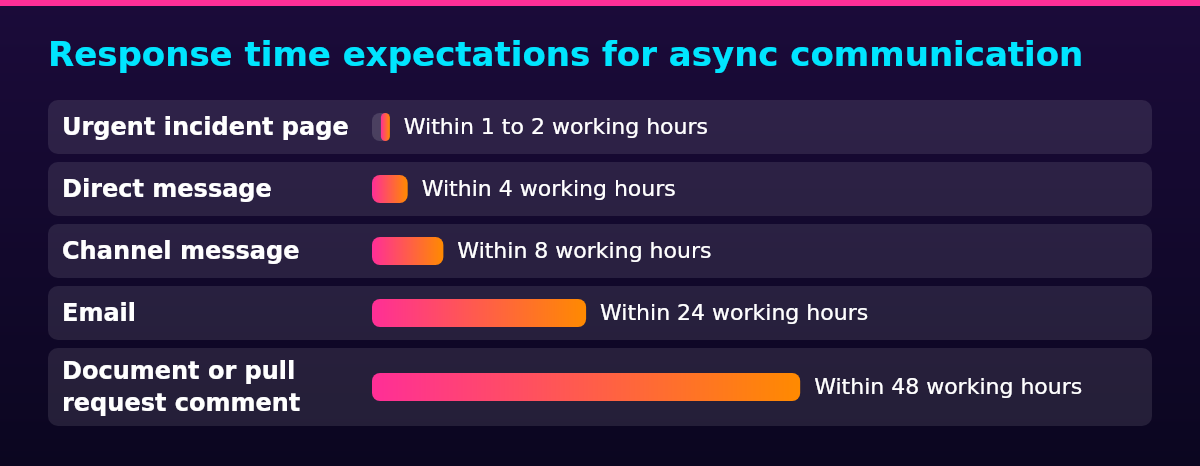
| Urgent incident page | PagerDuty or Opsgenie alert | Within 1 to 2 working hours | Phone the on-call lead |
| Direct message | A question to one teammate | Within 4 working hours | Post in the team channel |
| Channel message | A request posted for the team | Within 8 working hours | Direct message the channel owner |
| A vendor or cross-team request | Within 24 working hours | Forward to the channel that owns it | |
| Document or pull request comment | Review feedback on a spec or code change | Within 48 working hours | Raise it in the next written update |
| Weekly written update | The team’s Monday status post | Read before the next update | Flag blockers to the lead directly |
The exact expectations matter less than the fact of writing them down, because no universal response time exists: a two-person startup and an on-call engineering group mean different things by urgent. What a team needs is one table of async communication norms to point to, so nobody wonders whether silence means the answer is coming or the question got lost.
Response windows count working hours, not clock hours, so nobody is expected to answer at midnight their own time. They only work when they protect focus time: a same-hour expectation on every channel cancels the point of async work and turns the stack into an always-on inbox. The tight window above belongs to paging alone, which is why it has its own escalation path rather than a faster general norm.
Written norms also close a gap between what companies run and what workers want. Buffer’s 2023 State of Remote Work found that 37% of companies offer no-meeting times while 36% of workers wish theirs did, which points to habits drifting rather than norms being set on purpose. A written response table is the deliberate version of that setting.
Which decisions go async
The rule for which decisions go async vs sync is short: anything that leaves a written record goes async, and anything that needs people to think out loud together goes live. Status updates, document reviews, code reviews, proposals and announcements are all better asynchronous, because the written version becomes the record the team needs anyway.
Four cases go the other way. Conflict and sensitive feedback land better live, where tone travels and people can read faces. Incidents that need live coordination go synchronous on purpose, with the paging channel as the exception that breaks every norm. Negotiations, and decisions where the parties still disagree after one written round, also deserve a call, because a second written round costs days where a short conversation costs minutes.
Teams that default to async usually keep a small synchronous window for those cases, and a set core hours block carries the live decisions a written round could not settle. Whatever goes live still ends in writing: a one-paragraph decision record after the call keeps the archive complete, so the same question never needs a meeting twice.
Written updates for remote teams
Written updates for remote teams work when they follow a fixed format and live in one fixed home, so everyone knows where to look and what each line means. The format that holds up has three parts:
- Done: what shipped since the last update, one line per item
- Next: what the writer will work on until the next update
- Blocked: what is stuck, who is waiting on what, and until when
Daily written updates and a weekly written update both work; what matters is that the cadence is fixed, so the update is expected rather than requested. A team’s written updates also need one fixed home: an update posted only in a chat channel scrolls away within hours, while an update that also lands on the team’s wiki page stays findable months later.
Decisions get their own record, one page per decision: the question, the options considered, the call, the owner and the date. A decision written down this way survives the person who made it, and it answers the question a teammate asks six months later without anyone reconstructing the reasoning from memory.
Threads close in writing too. The last message in a resolved thread states the outcome in a sentence, so the record stands alone and a reader never has to replay the whole exchange to know what was decided.
Async communication tools
| Tool category | What it carries | Example |
|---|---|---|
| Written messaging | Day-to-day questions, updates and threads | Slack, Twist |
| Documents and decision records | Specs, notes and one-page decision logs | Notion, Confluence |
| Recorded video | Walkthroughs and demos without a live call | Loom, Vidyard |
| Task tracking | Who owns what, and when it is due | Linear, Asana |
| Incident paging | Alerts that must break the response window | PagerDuty |
The categories map onto the response norms: written messaging carries the short exchanges, documents carry the decisions, recorded video carries the demonstrations, task tracking carries the commitments and paging exists to break the window for incidents only. Slack is the default written layer at most companies, and setting Slack best practices such as channel naming and notification windows is its own piece of work, because a channel setup with no norms becomes an always-on inbox.
Loom
Best for: recorded walkthroughs and demos that replace live screen shares
Loom records the screen and the camera in one pass, so one teammate records a walkthrough once and everyone else watches it in their own hours, leaving comments pinned to the exact moment they mean instead of booking a call.
Pros
- One recording replaces the same walkthrough given several times
- Timestamped comments keep every reply attached to the right moment
- Viewers watch at their own pace and skip what they already know
Cons
- Small questions still get answered faster in a short call
- Long recordings need editing discipline, or viewers stop reaching the end
Notion
Best for: the fixed home for updates, docs and decision records
Notion keeps a team’s docs, weekly updates and one-page decision logs in one searchable place, so a written norm has somewhere to live and new hires can read the history without interrupting anyone for a recap.
Pros
- Updates sit next to the docs and decisions they reference
- Search turns months of written decisions into a usable archive
- Templates keep the update format fixed without policing
Cons
- The structure drifts without an owner who prunes it
- A quick back-and-forth question is faster in chat
Linear
Best for: task tracking where the record is the work
Linear tracks issues, owners and due dates in one place, so decisions made in writing land as assignable work instead of dissolving into chat history.
Pros
- Every issue carries its context, owner and deadline in one object
- Cycles give a fixed rhythm for written updates to report against
- The record of what shipped replaces most status meetings
Cons
- Adds little where the work already lives in pull requests
- It tracks work but carries no conversation, so it pairs with a messaging tool
How to improve remote collaboration
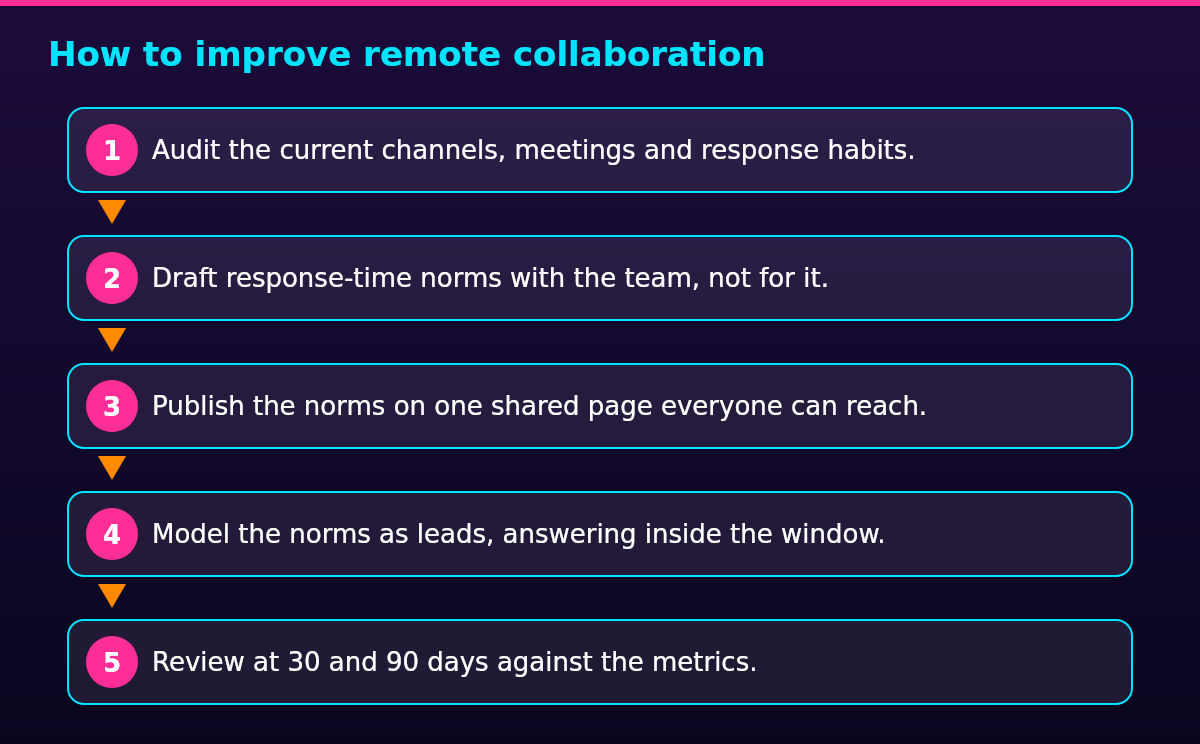
Improving remote collaboration with async norms is a change project rather than an announcement, and it runs in five steps: audit what exists, draft the norms with the team, publish them, model them as leads, then review against metrics.
- Audit the current channels, meetings and response habits.
- Draft response-time norms with the team, not for it.
- Publish the norms on one shared page everyone can reach.
- Model the norms as leads, answering inside the window.
- Review at 30 and 90 days against the metrics.
Three metrics say whether the rollout worked: the share of messages answered inside their window, meeting hours per person per week, and cycle time from a request landing to work finishing. Meeting hours give most teams their baseline, because Buffer’s 2023 State of Remote Work found that 75% of remote workers spend one to ten hours a week in meetings, which leaves a lot of room to cut.
The 30 and 90 day reviews close the loop on the wider job of managing a remote team, because the cadence the rollout sets for updates and one-to-ones is the same cadence the rest of the team runs on. A team that reviews its communication norms on the calendar, rather than only when something breaks, keeps the norms alive once the novelty fades.
Where async communication breaks down
The main issue with asynchronous communication is decision latency: a decision that needs three rounds of written feedback can sit for three days, where a fifteen-minute call would have settled it on the day. The fix is the decision rule above, applied honestly: after one written round without agreement, the issue goes live instead of into a second thread.
Written messages also lose tone. A short reply reads as curtness, and a slow reply reads as disagreement with the plan, when neither was meant. Response norms fix the delay half by making silence normal, and writing norms fix the tone half: questions end with a question, deadlines end with a date, and disagreement goes to a call instead of a longer thread.
The third failure is isolation. Async-first is not contact-free, and new joiners feel it most, because a culture that lives in documents and threads is invisible unless someone points to it. Scheduled synchronous time carries the human half: a weekly team call, a one-to-one every week or two, and an onboarding buddy who answers the small questions as they come up.
FAQ
No: asynchronous communication is not face to face, because the two sides are never present at the same time. A recorded video shows a face, but the viewer watches hours after the recording, so the exchange still runs on a response window rather than a shared moment. Live conversation, whether in a room or on a call, is synchronous by definition.
Five advantages of async communication stand out for remote teams: a written record anyone can search later, response windows that cross time zones, longer stretches of focus between interruptions, more considered answers written away from a live audience, and room for quieter teammates to contribute on equal terms. Each advantage depends on the norms being written down, which is why a team that adopts async without setting them tends to see none of the five.
Synchronous communication happens in real time, with both sides present at once: a meeting, a phone call, a live chat or a face-to-face conversation. The difference from asynchronous communication is the response window. Synchronous expects an answer now, and async expects it inside an agreed time, which is why the same tool can host either: a live thread worked in the moment is synchronous, and the same thread read and answered the next morning is async.
Yes, Zoom is synchronous: everyone joins the same live call at the same time and answers in real time. Recordings and transcripts give a Zoom session an asynchronous second life afterward, since anyone who missed the call watches it later, but the meeting itself consumed shared hours when it happened. That is also why a meeting-heavy team is not an async team, whatever tools it runs.