

On this page
Slack alternatives are messaging and team communication tools built for remote work: chat, channels, threads and integrations. The best free and paid Slack alternatives for remote teams are Microsoft Teams, Google Chat, Twist, Zulip, Mattermost, Rocket.Chat, Pumble and Discord, compared on threading, guest access for contractors, data residency and price per seat, from free plans to $8 per user a month against Slack Pro’s $7.25 billed annually. Mattermost and Rocket.Chat publish no per-seat pricing.
Slack alternatives compared
| Tool | Best for | Starting price (USD) | What stands out |
|---|---|---|---|
| Microsoft Teams | Companies already on Microsoft 365 | Priced inside Microsoft 365 suites; no standalone figure | Chat, files and meetings in one bill |
| Google Chat | Teams already paying for Google Workspace | Included in every plan; Starter currently $7.00 per user a month | Adds no second chat bill |
| Twist | Async-first teams that want threads by default | Free plan; Unlimited currently $6 per user a month | Threads are the unit of conversation |
| Zulip | Threaded, topic-based chat | Free plan; Cloud Standard currently $6.67 per user a month | Topics keep discussions whole |
| Mattermost | Data-controlled self-hosted chat | Doesn’t publish standard pricing | Deploys on-prem or air-gapped |
| Rocket.Chat | Regulated teams that self-host | Doesn’t publish standard pricing | Free self-managed workspace |
| Pumble | The lowest per-seat price with a real free tier | Free plan; Pro currently $2.49 per user a month | Unlimited history even on the free plan |
| Discord | Informal teams on a zero budget | No per-seat pricing; Nitro from $2.99 a month | Guest access via invite link |
Prices are the vendors’ own current published rates in US dollars, read from their pricing pages in October 2026, and where a vendor sells only by quote, the cell says so instead of a number. Two entries bundle chat into a bigger subscription and the rest sell per seat, which is the first split in the table above.
Chat bundled with office suites
The entry decision in this group is the subscription the company already pays for: both tools attach chat to documents, email and meetings, so the chat line item disappears into a bill that exists anyway.
Microsoft Teams
Best for: companies already on Microsoft 365
Microsoft Teams runs channels, chat and meetings inside the Microsoft 365 subscriptions many companies already pay for, so moving off Slack is mostly a training project rather than a new bill. The current lineup runs from Teams Essentials with Microsoft Entra ID through Microsoft 365 Business Basic, Standard and Premium, and the business suites are capped at 300 users.
Microsoft no longer sells Teams inside every suite everywhere: new enterprise customers have bought it as a separate product since April 1, 2024, a change that took effect in the European Economic Area (EEA) and Switzerland on October 1, 2023, per Microsoft’s licensing documentation. For a company already buying a Microsoft 365 business suite, the real comparison is the suite price it already pays against Slack Pro’s $7.25 per seat billed annually.
Pros
- One subscription covers chat, meetings and files
- A standalone chat plan, Teams Essentials with Microsoft Entra ID, exists for teams without a full suite
Cons
- New enterprise customers have bought Teams as a separate product since April 1, 2024, which changes the price comparison by region
- Business suites stop at 300 users
Google Chat
Best for: teams already paying for Google Workspace
Google Chat is included in every Google Workspace plan rather than sold as a separate chat bill, so a company running Gmail, Calendar and Meet pays nothing beyond the subscription it already has. For distributed teams, the chat decision folds into a suite decision the company has usually already made.
The Workspace pricing page currently lists Starter at $7.00, Standard at $14.00 and Plus at $22.00 per user a month billed annually, with new-customer discounts on the first months that revert to these standard rates. Starter, Standard and Plus each cap at 300 users, and enterprise data regions, the option that decides where content is stored, arrive only on Enterprise plans.
Pros
- Chat is included in every Workspace plan, with no second chat bill
- The Starter entry price sits just under Slack Pro at $7.00 per user a month
- Enterprise plans add data regions for content location
Cons
- Starter, Standard and Plus plans stop at 300 users
- Data regions arrive only on Enterprise plans
- No free workplace plan appears on the pricing page
Chat built for async work
Async teams read in bursts between focused work, so the tools in this group keep each discussion whole and findable instead of rewarding the fastest typist. Both also protect the few core hours of real overlap a distributed team has.
Twist
Best for: async-first teams that want threads by default
Twist makes the thread the unit of conversation rather than the channel, so a teammate in another time zone opens one whole discussion and reads it on their own schedule. That structure suits remote teams whose members rarely share working hours.
The Twist pricing page lists a free plan at $0 with one month of comments and messages, five integrations, 5 GB of file storage and up to 500 internal members plus 500 external guest accounts. The Unlimited plan currently costs $6 per user a month, with single-channel guests free and multi-channel guests billed like team members, which keeps contractor access cheap.
Pros
- Threads by default keep long decisions readable
- Up to 500 external guest accounts even on the free plan
- Single-channel guests stay free on Unlimited
Cons
- The free plan keeps only one month of history
- Five integrations on the free plan
Zulip
Best for: threaded, topic-based chat
Zulip splits every channel into topics, so each message lands in a threaded conversation that teammates follow by subject. Catching up means reading named topics, not scrolling a channel for context.
The Zulip plans page lists Cloud Free at $0 with 10,000 messages of search history and 5 GB of storage, Cloud Standard currently at $6.67 per user a month billed annually or $8 monthly, and Cloud Plus currently at $10 annually or $12 monthly with a 10-user minimum. Self-hosted Zulip is open source and free, with mobile push notifications capped at 10 users for most workplaces and paid self-hosted plans from $3.50 per user a month.
Pros
- Every message belongs to a named topic
- Open source, with a free self-hosted option
- Cloud Standard undercuts Slack Pro at $6.67 per user a month
Cons
- Cloud Plus carries a 10-user minimum
- The topic layout takes adjustment for teams used to plain channels
Self-hosted chat for data control
Self-hosted chat gives the employer data control where content cannot sit on someone else’s servers, and both tools in this group are built around owning the server. Neither publishes per-seat pricing, so both are quoted per deployment.
Mattermost
Best for: security and data sovereignty
Mattermost is built for organizations that must control where chat data lives: it deploys on-premise, in a private or sovereign cloud, air-gapped, or on infrastructure the employer runs on AWS, Azure or Kubernetes. Residency stops being a vendor plan tier and becomes a server location the employer picks.
Mattermost doesn’t publish standard per-seat pricing: its Mattermost pricing page sells Professional, Enterprise and Enterprise Advanced by quote, sold as prepaid annual subscriptions tied to seat counts, with a free limited-use edition for technical evaluation.
Pros
- Deploys on-premise, air-gapped or on your own cloud accounts
- Data residency becomes a server location you control
- A free limited-use edition exists for evaluation
Cons
- No published per-seat pricing; every purchase starts with a quote
- Running it takes operational staff, unlike a cloud plan
Rocket.Chat
Best for: regulated and data-sensitive teams
Rocket.Chat sells deployment control to teams with compliance pressure, with separate Commercial, Government and Defense lineups. A free self-managed workspace ships with the core collaboration and security features, so a small team can run on its own infrastructure at $0.
Rocket.Chat doesn’t publish standard per-seat pricing: its Rocket.Chat pricing page quotes the Commercial, Government and Defense plans individually and points technical evaluations, small businesses and non-profits at its Starter plan.
Pros
- A free self-managed workspace with core collaboration and security features
- Government and Defense lineups for regulated environments
Cons
- Paid plans are quote-only, so budgeting starts with a sales conversation
- Self-managed deployments put updates and uptime on your team
Low-cost chat options
The low-cost chat options here carry the shortlist’s cheapest seats, and their free tiers are real workspaces rather than trials. The trade-offs are guest licensing and app limits.
Pumble
Best for: the lowest per-seat price with a real free tier
Pumble keeps unlimited message history even on its free plan, which matters for distributed teams that search old decisions across time zones. Its paid seats are the cheapest on this list.
The Pumble pricing page lists the free plan at $0 for unlimited users with unlimited message history, unlimited channels, 10 GB of storage per workspace and up to three apps. Pro currently costs $2.49 per user a month billed annually ($2.99 monthly) and Business currently $3.99 ($4.99 monthly), with guest access arriving at Business: each paid seat includes five free single-channel guests, and multi-channel guests need their own paid seat. Enterprise currently runs $6.99 annual ($7.99 monthly).
Pros
- Unlimited message history on the free plan
- Pro at $2.49 per user a month is the cheapest paid seat on this list
- Five free single-channel guests per Business seat
Cons
- Guest access for contractors starts at the Business tier
- The free plan caps connected apps at three
Discord
Best for: informal teams and communities on a zero budget
Discord organizes chat into persistent servers that contractors and community members join with an invite link, with no per-seat licenses to manage. It is built for communities, so the admin, retention and compliance expectations of a workplace are not its center of gravity.
Discord publishes no per-seat business pricing; its only listed paid products are the individual Nitro memberships, currently listed at $2.99 a month for Nitro Basic and $9.99 a month for Nitro, with the cost varying by country and plan.
Pros
- The core product costs $0, with no seat licenses to buy
- Guest and contractor access is an invite link, not a license
Cons
- Workplace admin, retention and compliance controls are not its design center
- Nitro perks are individual memberships, so they do not scale as a team purchase
Cost comparison
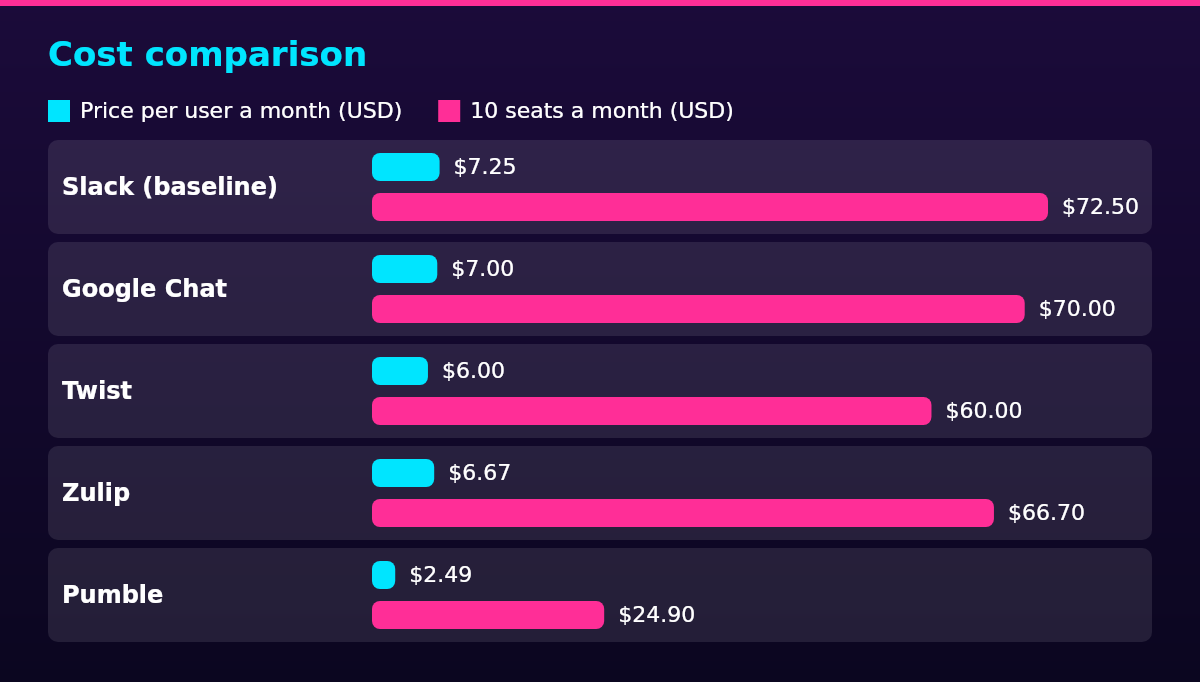
| Tool | Entry plan | Price per user a month (USD) | 10 seats a month (USD) |
|---|---|---|---|
| Slack (baseline) | Pro | $7.25 | $72.50 |
| Microsoft Teams | Microsoft 365 Business Basic suite | Priced with the suite | Priced with the suite |
| Google Chat | Workspace Starter | $7.00 | $70.00 |
| Twist | Unlimited | $6.00 | $60.00 |
| Zulip | Cloud Standard | $6.67 | $66.70 |
| Mattermost | Professional | By quote | By quote |
| Rocket.Chat | Commercial | By quote | By quote |
| Pumble | Pro | $2.49 | $24.90 |
| Discord | Free server | $0 | $0 |
Every per-seat figure is the vendor’s own current published rate, linked at its entry above, and the 10-seat column multiplies that rate by ten. Free tiers stop scaling on their caps rather than their price: Twist’s free plan keeps one month of history, Zulip Cloud Free keeps 10,000 messages of search history, Pumble’s free plan allows three apps, and Slack’s own free plan keeps 90 days of history and ten apps, per Slack’s pricing page.
Per-seat pricing wins when chat is the only thing being bought: Pumble Pro at $24.90 a month for ten seats runs about a third of Slack Pro’s $72.50 baseline, while the bundled options pay off only when the documents, email and meetings around the chat are worth their suite price anyway. The cheapest fix for a noisy chat is usually habits rather than a new tool, and the Slack best practices for remote teams on channel discipline and notification hygiene cost nothing to apply.
Compliance rules for team chat
In the EU, chat messages that relate to identifiable people are personal data under the General Data Protection Regulation (GDPR), so lawful basis, transparency and cross-border transfer rules follow the messages to wherever they are stored. That turns data residency into a buying criterion: cloud tools answer it with residency options on Slack’s Business+ and Enterprise+ tiers and on Google Workspace Enterprise plans, and the self-hosted tools answer it by letting the employer choose the server.
In the EEA and Switzerland, the price comparison itself changed: Microsoft has sold Teams separately from its Microsoft 365 suites there since October 1, 2023, and worldwide since April 1, 2024, as Microsoft’s licensing documentation records. A team comparing a Teams bundle with per-seat chat tools is comparing different product structures by region.
In the US, no federal rule mandates a team-chat tool, so treat retention, export and legal holds as feature comparisons: they decide how well chat records hold up for e-discovery and record-keeping, not whether a tool may be used. For employers covered by the Health Insurance Portability and Accountability Act (HIPAA), Slack’s pricing page lists HIPAA support only on the Enterprise+ tier at $45 per user a month billed annually, while the self-hosted tools put the server, and the responsibility for its safeguards, under the employer’s control.
Scaling framework
The best team chat tool changes with team size: free tiers carry a remote team under 10 seats, per-seat plans cover 10 to 50, admin features and data controls decide 50 to 300, and architecture decides past 300. Under 10 seats, the free tiers do the work: Pumble Free, Zulip Cloud Free, Discord and Slack’s free plan all cost $0, and the caps that bite are history, storage and app counts rather than seats.
From 10 to 50 seats, paid plans start at the entry prices above: Twist Unlimited at $6, Pumble Business at $3.99, Google Workspace Starter at $7.00 and Slack Pro at $7.25 per user a month billed annually, or a Microsoft 365 suite for companies already in that ecosystem.
From 50 to 300 seats, administration starts to matter: single sign-on, retention controls and data options push teams toward Slack Business+ at $15 per user a month billed annually, which currently includes data residency, or Google Workspace Standard at $14.00. Microsoft’s business suites hold to the same 300-user ceiling, so the mid-size choice is really about which suite or cloud the company already runs.
Past 300 seats, or in regulated work, the shortlist narrows by architecture: Slack Enterprise+ at $45 per user a month billed annually adds HIPAA support and legal holds, Microsoft hands off to enterprise plans, and self-hosted Mattermost or Rocket.Chat put the ceiling where the employer’s infrastructure puts it. The chat tool is one part of how you manage a remote team, and headcount plus compliance needs should pick the tier before brand familiarity does.
FAQ
There is no single best pick: Microsoft Teams suits companies already on Microsoft 365, Google Chat suits teams already paying for Google Workspace, Twist and Zulip suit async-first teams, Mattermost and Rocket.Chat suit teams that must control their servers, and Pumble and Discord suit tight budgets. The decision follows the subscription the company already runs and where its data is allowed to live.
Microsoft Teams is, by reach: it ships inside the Microsoft 365 subscriptions many companies already buy, which makes it the default alternative before any shortlist starts. The rest of the field splits among Google Chat for Workspace shops, async tools like Twist and Zulip, and self-hosted Mattermost and Rocket.Chat.
Nothing is replacing Slack outright; the field is splitting by need, with suite-bundled chat on one side, async-first tools like Twist and Zulip on another, and self-hosting where data control decides. A team that switches trades Slack’s integrations for either a lower price or more control over where its data sits.
For workplace chat, five tools cover most remote teams: Slack, Microsoft Teams, Google Chat, Twist and Pumble, judged on threading, guest access, data residency and price per seat. Consumer messaging apps answer a different question and are not workplace tools.
No, not across the board: Mattermost is the better fit where data control, self-hosting and air-gapped deployment decide the purchase, and Slack is the better fit where a turnkey cloud service with no servers to run decides it. The honest comparison is by criterion, not by rank.