
On this page
Automated payroll software is the tool that calculates, withholds and files payroll taxes, and choosing it starts with price: published base fees across the seven tools here currently run from $17 to $59 a month. The best automated payroll software for a US remote team splits by what your team already runs: Rippling for HR, IT and payroll in one system, QuickBooks Payroll for teams already on its accounting, Roll by ADP for a published price from ADP’s small-business app, Patriot Payroll and SurePayroll for the lowest published prices, Square Payroll for hourly and contractor-heavy teams, and Deel for US contractors and the first hire outside the US.
The comparison judges each tool on three things: its published price (base plus per-worker, in USD), what it automates (tax calculation, filing and deposits, multi-state handling), and its platform depth (HR, benefits, contractors, international). Per-worker fees currently run from $4 to $8 across the six US payroll platforms, and Deel publishes US payroll at $29 per employee per month (self-service) and contractor payroll at $49 per contractor per month, all read from each vendor’s own pricing page as of November 2026. The scope is US payroll automation: the mechanics of multi-state payroll are their own topic, and paying employees across several countries is a different purchase.
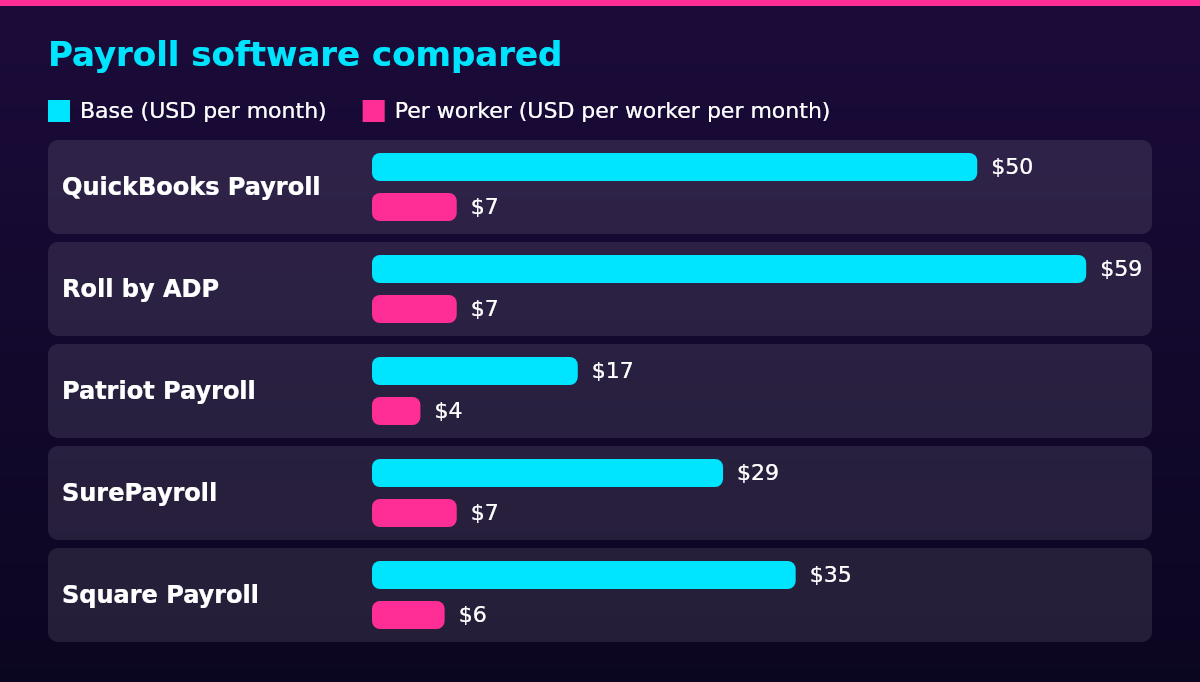
Payroll software compared
| Tool | Best for | Base (USD per month) | Per worker (USD per worker per month) | What stands out |
|---|---|---|---|---|
| Rippling | Running HR, IT and payroll in one system | not published | $8 | Payroll module priced by custom quote |
| QuickBooks Payroll | Teams already on QuickBooks accounting | $50 | $7 | Three published tiers, up to $134 a month plus $17 per worker |
| Roll by ADP | A published price from ADP’s small-business app | $59 | $7 | Taxes calculated, deducted and paid in all 50 states |
| Patriot Payroll | The lowest published base price | $17 | $4 | Tax filing sits on the Full Service plan, $37 a month plus $5 per worker |
| SurePayroll | Tax filing included at a self-serve price | $29 | $7 | No Tax Filing option at $20 a month plus $4 per employee; multi-state fee $9.99 a month |
| Square Payroll | Hourly and contractor-heavy teams | $35 | $6 | Contractor-only plan at $6 per person a month |
| Deel | US contractors and first international hires | not published | $29 per employee per month (self-service) | Contractor payroll at $49 per contractor a month; employer of record at $599 per employee a month |
All-in-one people platforms
The best all-in-one payroll platforms here suit teams that want payroll riding a wider system: Rippling connects it to HR and IT, QuickBooks Payroll to the company’s books, and Roll by ADP to ADP’s own lineup.
Rippling
Best for: Teams running HR, IT and payroll in one system
Rippling treats payroll as one module in a wider system that also covers HR, benefits and IT device management, so a team that wants people operations under one login can add payroll without a second vendor. It also runs an employer of record product for hiring outside the US.
Plans start at $8 per employee per month, and every plan carries a monthly base fee whose amount is not published; the Rippling pricing page prices the Payroll module by custom quote.
Pros
- Payroll inside one system for HR, IT and benefits
- A published per-employee start at $8
- An employer of record product for hires outside the US
Cons
- The monthly base fee is not published
- The Payroll module is priced by custom quote
QuickBooks Payroll
Best for: Teams already on its accounting platform
QuickBooks Payroll runs beside QuickBooks accounting, so a team that already keeps its books there can run payroll against the same data rather than in a disconnected tool.
Its Workforce Payroll plan currently lists at $50 a month plus $7 per employee, with Premium at $88 plus $13 and Elite at $134 plus $17, per the QuickBooks Payroll pricing page.
Pros
- Published prices on all three tiers
- Payroll beside the books for teams already in QuickBooks
- Optional add-ons priced separately, including background checks from $29.99 a report
Cons
- The pricing page currently leads with a 70% off sale; the standard prices sit under it
- The per-employee fee rises to $13 on Premium and $17 on Elite
Roll by ADP
Best for: A published price from ADP’s small-business app
Roll by ADP is ADP’s payroll app for small teams, and it publishes its price where ADP’s mainline packages quote. ADP’s quote-only full-service packages are a different purchase, priced product by product in the ADP payroll pricing breakdown.
Roll currently lists at $59 a month plus $7 per employee on its pricing page, with taxes calculated, deducted and paid for you, payroll in all 50 states, both W-2 employees and 1099 contractors, unlimited runs, and no long-term contracts.
Pros
- A published price with unlimited payroll runs
- Taxes calculated, deducted and paid, in all 50 states
- Pays W-2 employees and 1099 contractors
Cons
- An app for small teams rather than ADP’s full-service line
- The three-month free trial carries terms and conditions
Lower-cost payroll platforms
The cheapest payroll platforms for small teams publish base fees from $17 to $35 a month, and the differences that matter are what each does with tax filing and extra states.
Patriot Payroll
Best for: The lowest published base price
Patriot Payroll publishes the lowest base fee of the seven, with worked pricing examples from one to 50 workers printed on its own page, which suits a small US team that wants a predictable monthly bill.
Basic Payroll currently costs $17 a month plus $4 per worker paid, and Full Service Payroll $37 a month plus $5 per worker paid, per the Patriot pricing page; Basic does not file taxes, while Full Service includes federal and state filings and deposits.
Pros
- The lowest published base fee of the seven, at $17 a month
- Full Service adds federal and state tax filings and deposits
- Worked examples printed on the page: 10 workers cost $57 a month on Basic and $87 a month on Full Service in one state
Cons
- Basic Payroll leaves tax filing and deposits to you
- Each additional state filing is $12 per month, per state
- Time and Attendance and HR add-ons are each $6 a month plus $2 per employee
SurePayroll
Best for: Tax filing included at a self-serve price
SurePayroll wraps payroll tax filing and deposit into its main plan at a price a small team can buy without a quote, with unlimited runs on every plan.
Its Full Service plan currently shows at $29 a month plus $7 per employee on the SurePayroll pricing page, with a No Tax Filing option at $20 a month plus $4 per employee that leaves filing and deposits to you, and multi-state payroll listed at $9.99 a month.
Pros
- Payroll taxes filed and deposited automatically on the main plan
- Multi-state payroll at a listed $9.99 a month
- Unlimited payroll runs at every tier
Cons
- Year-end W-2 and 1099-NEC forms bill separately, annually, at a $50 base fee plus $5 per form
- Different sections of its own page list the Full Service plan at $29 and at $39 a month
Square Payroll
Best for: Hourly and contractor-heavy teams
Square Payroll runs inside the rest of Square, so a team already using Square pays its people inside the same system.
Full-service payroll currently costs $35 a month plus a $6 monthly fee per person paid, and the contractor-only plan costs $6 a month per person paid, as printed on Square’s payroll page.
Pros
- A contractor-only plan at $6 per person a month
- Full-service payroll inside the same system as the rest of Square
- Two published prices, one for full service and one for contractors only
Cons
- Built for teams already in the Square ecosystem
- No multi-state fee published on its payroll page
Payroll across borders
For contractors and international hires, one of the seven covers the moment a US payroll list stops being purely domestic: contractors abroad, or the first employee hired outside the US.
Deel
Best for: US contractors and first international hires
Deel is built for paying a mix of employees, contractors and international hires from one platform, so a US team does not need a second vendor for its first hire abroad; teams paying employees in several countries compare providers in the global payroll providers roundup.
Its pricing page currently lists US payroll at $29 per employee per month (self-service), contractor payroll at $49 per contractor per month, and employer of record at $599 per employee per month, per the Deel pricing page.
Pros
- A published US payroll figure at $29 per employee per month
- Contractor payroll at $49 per contractor per month
- An employer of record route for the first hire outside the US, at a published $599 per employee a month
Cons
- The published US payroll figure is the self-service plan
- Country-by-country coverage is a separate comparison, not a single price list
Cost comparison
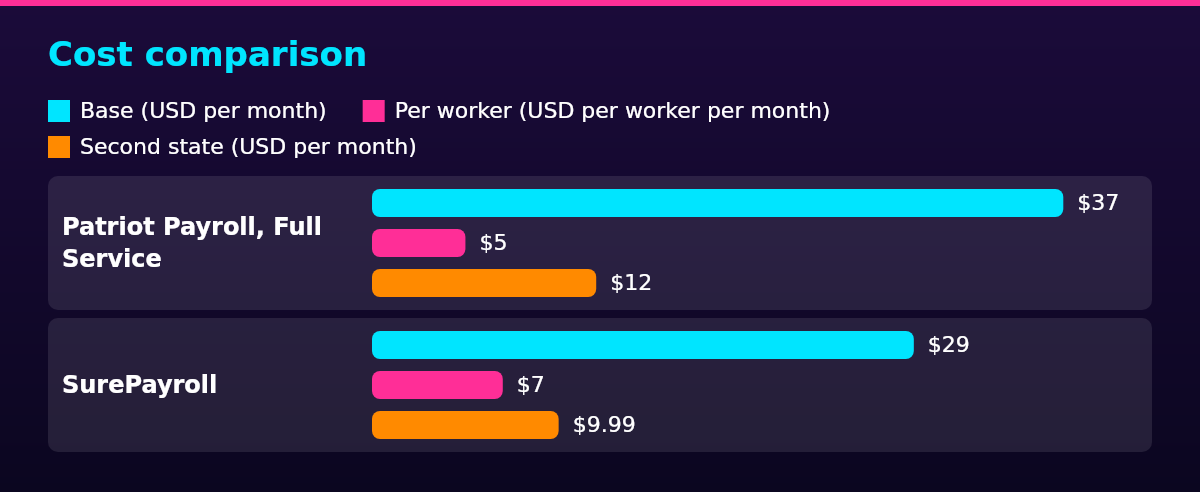
| Tool | Base (USD per month) | Per worker (USD per worker per month) | Second state (USD per month) |
|---|---|---|---|
| Rippling | not published | $8 | not published |
| QuickBooks Payroll | $50 | $7 | not published |
| Roll by ADP | $59 | $7 | not published |
| Patriot Payroll, Full Service | $37 | $5 | $12 |
| SurePayroll | $29 | $7 | $9.99 |
| Square Payroll | $35 | $6 | not published |
| Deel | not published | $29 per employee per month (self-service) | not published |
Patriot’s row shows its Full Service plan, the one that files in a second state. At 10 people, with nine in one state and one in a second, the monthly bill from the published components works out to:
- Patriot Full Service: $37 + (10 x $5) + $12 = $99 a month
- SurePayroll: $29 + (10 x $7) + $9.99 = $108.99 a month
- Square Payroll: $35 + (10 x $6) = $95 a month
- QuickBooks Payroll: $50 + (10 x $7) = $120 a month
- Roll by ADP: $59 + (10 x $7) = $129 a month
- Rippling: at least (10 x $8) = $80 a month, plus an unpublished base fee, with the Payroll module quoted
- Deel: (10 x $29) = $290 a month on its published self-service US payroll figure
Rippling, QuickBooks Payroll, Roll by ADP and Square Payroll publish no separate multi-state fee on their own payroll pages. SurePayroll bills year-end W-2 and 1099-NEC forms annually at $50 plus $5 a form, and Patriot lists nominal 1099 e-filing fees for Basic Payroll customers.
Legal compliance
Automated payroll software calculates, withholds and files what it is configured to file; the legal duties stay with you, and they vary by state and worker status.
At the federal level, the software calculates income tax withholding, the employer’s share of Social Security and Medicare, and the federal unemployment tax (FUTA), and makes the deposits; the rules and current rates sit in the IRS’s Publication 15.
You register as an employer in each state where an employee works, and several states, among them New York, Delaware, Nebraska and Pennsylvania, can tax an out-of-state remote employee’s wages under their convenience of the employer rules.
Whether a worker is a W-2 employee or a 1099-NEC contractor changes what the software withholds; the IRS’s independent contractor tests decide the answer, and what misclassification costs when the answer is wrong is its own topic.
W-2 and 1099-NEC forms carry IRS filing deadlines, spelled out on the 1099-NEC form page, and workers’ compensation for remote employees is set rule by rule at the state level.
Scaling framework
When to switch payroll software as your team grows depends on headcount, states and how much of the team sits outside payroll itself.
For a first hire or two on a lean budget, Patriot Payroll and SurePayroll publish the lowest entry points: $17 plus $4 a worker with self-filing on Patriot Basic, $29 plus $7 an employee with filing included on SurePayroll Full Service, or $37 plus $5 a worker on Patriot Full Service.
As the team grows past its first hires and spreads across states, the platform matters more: QuickBooks Payroll for teams already in QuickBooks, Square Payroll where the business already runs on Square, and Roll by ADP for a published all-states price at $59 plus $7.
When HR, benefits and IT depth under one login start to matter more than the payroll bill itself, Rippling is the pick, with its published $8 per-employee start sitting on top of an unquoted base.
For contractors and the first hire outside the US, Deel covers the border cases at published figures, and a dedicated global payroll platform takes over as countries multiply. At larger headcounts, a dedicated service rep and negotiated pricing become the draw, and the quote-only full-service operators take over, such as ADP’s RUN packages, Paychex and Paycor.
FAQ
Examples of payroll software include Rippling, QuickBooks Payroll, Roll by ADP, Patriot Payroll, SurePayroll, Square Payroll and Deel, the seven compared here, along with Gusto, Paychex and Paycor.
Roll by ADP is ADP’s own answer to that question: it is the app with a published $59 a month plus $7 per employee price, while ADP’s RUN packages for larger teams are quote-only. Against the quote-only packages, the published-price alternatives are Patriot Payroll at $17 plus $4 (or $37 plus $5 with filing), SurePayroll at $29 plus $7 with filing included, Square Payroll at $35 plus $6, and QuickBooks Payroll at $50 plus $7. Which one wins depends on headcount, states and whether the software files your taxes.
No. Microsoft 365 is the office suite of Word, Excel, Teams and email, and it does not process payroll. Employers run payroll in dedicated payroll software and, where the tool supports it, export the data to Excel for reporting.
The US payroll system is a federal framework with state layers: federal income tax withholding, Social Security and Medicare contributions, and federal unemployment tax, all set by the IRS in Publication 15, with state income tax, state unemployment insurance and local payroll taxes on top where they apply. Automated payroll software calculates and files these in the states where it is configured to file, and the registration stays the employer’s job.