
On this page
Employee scheduling and time tracking software builds the shift roster and clocks the hours your staff work against it, and eight tools compared here do both: Connecteam for phone-first hourly teams, Apploye for tying shifts to attendance data, Deputy for multi-location labor compliance, Homebase and Sling for small hourly teams on a budget, 7shifts for restaurant rotas, Jibble for a free time clock, and QuickBooks Time for teams already on Intuit payroll. A 10-person team pays $0 to $120 a month for employee scheduling and time tracking software at current published prices.
Employers whose people work shifts are the audience here: teams that only need hours, timesheets and payroll exports belong to the time tracking software for remote employees roundup, while screenshots and activity scores are the employee monitoring software category, a different purchase with different rules. A tool that schedules but does not clock hours leaves payroll reconciling planned shifts against actual work by hand, and a time clock with no schedule cannot flag the gap between the labor you planned and the labor you paid.
Employee scheduling tools compared
| Tool | Best for | Starting price (USD) | What stands out |
|---|---|---|---|
| Connecteam | Phone-first shift teams | $0 up to 10 users, then $29 a month | Flat price covers the first 30 users |
| Apploye | Shifts tied to attendance data | $4.50 per user a month billed annually | Free Starter plan covers 10 users, without scheduling |
| Deputy | Multi-location compliance flags | $5 per user a month billed annually | Labor law checks run while you schedule |
| Homebase | Scheduling, clock and payroll together | $0 for 10 employees at one location, then $30 a month | Payroll attaches to the same app |
| Sling | Low per-seat pricing | $2 per user a month | Scheduling free for up to 30 users |
| Jibble | A free time clock | $0 for unlimited users | GPS clock-ins and offline punches |
| 7shifts | Restaurant rotas | $44.99 per location a month | Built for hospitality schedules and tips |
| QuickBooks Time | Teams on Intuit payroll | $20 a month plus $10 per user | All plans include scheduling |
Every price above was read from the vendor’s own pricing page on October 22, 2026, and each entry below links the page it came from. There is no single best employee scheduling and time tracking software for every team: the right pick turns on whether your people swap shifts freely, work across many sites, or clock in from job locations.
Distributed shift teams
Connecteam
Best for: distributed hourly and field teams that clock in from the phone they carry
Connecteam combines job scheduling and a one-tap time clock in its Operations hub, an app built for staff who work from a phone rather than a desk. Forms and quick tasks sit in the same hub, so a shift worker sees the roster, the clock and the day’s checklist in one place.
Its Operations Basic plan currently costs $29 a month for the first 30 users billed yearly, or $35 billed monthly, with each additional user at $0.80 a month on the yearly rate, on the Connecteam pricing page. The free plan covers up to 10 users.
Pros
- Free for up to 10 users
- Flat $29 covers the first 30 users, so the bill holds steady while a team grows
- Time clock, job scheduling and tasks in one phone app
Cons
- Priced per hub, so adding HR or communication features raises the bill
- Monthly billing costs $35 rather than the $29 yearly rate
Apploye
Best for: teams that tie shift schedules to attendance and hours data
Apploye pairs timesheets and attendance with shift scheduling, so the roster and the hours the team actually works stay in one system. Its schedule adherence report flags late starts and missed shifts against the roster, and automatic clock in and out runs on every plan, including the free tier. That suits a distributed team coordinating people across sites and projects.
Its Elite plan currently costs $4.50 per user a month billed annually, or $7 billed monthly, and includes shift scheduling and schedule adherence, on the Apploye pricing page. The Starter plan is free for up to 10 users but excludes shift scheduling, and the Power plan costs $8 per user a month billed annually.
Pros
- Free Starter plan for up to 10 users
- Shift scheduling and schedule adherence reporting included from the Elite plan
- Automatic clock in and out on every plan, including the free tier
Cons
- Shift scheduling is excluded from the free Starter plan, so the roster carries a paid tier
- Screenshots and activity tracking are part of the paid plans, more oversight than some hourly teams want
Deputy
Best for: multi-location teams that need labor law checks while scheduling
Deputy runs scheduling, timesheets and a time clock with labor law compliance checks included from its entry plan. Shift swapping, leave and availability management carry the same base plan, which suits teams spread across sites and states.
Its Lite plan currently costs $5 per user a month billed annually, or $5.50 billed monthly, per the Deputy pricing page. Core is $6.50 per user a month annually and Pro is $9, and monthly plans carry a minimum spend of $30 an invoice, a term the page dates to September 1, 2025.
Pros
- Labor law compliance checks included from the Lite plan up
- Shift swapping and leave management in the base plan
- Deputy Payroll available at $8 per user a month plus a $49 monthly base fee
Cons
- Deputy Payroll stacks a $49 monthly base fee on top of per-user pricing
- Biometrics time clocking and advanced compliance sit in the Core plan
Small hourly teams
Homebase
Best for: US small businesses that want scheduling, a time clock and payroll in one app
Homebase sells scheduling, a time clock and payroll together, which suits a small hourly team that runs from roster to paycheck in one place. Its Basic plan covers basic scheduling and basic time tracking at no cost.
Its Essentials plan currently costs $30 a month per location billed monthly, or $24 billed annually, with unlimited employees, on the Homebase pricing page. Payroll is an add-on on every plan at $49 a month plus $6 per employee paid.
Pros
- Free for one location with up to 10 employees
- Flat per-location pricing with unlimited employees on paid plans
- Scheduling, time clock and payroll in one app
Cons
- Payroll costs an extra $49 a month plus $6 per employee paid
- The free Basic plan is capped at one location and 10 employees
Sling
Best for: teams that want scheduling free and pay only for the clock
Sling makes shift scheduling free for up to 30 users and charges for the time tracking layer, which suits a team that coordinates shifts well already and needs clean hours for payroll. Premium adds mobile time tracking, labor cost management and overtime tracking; Business adds kiosk clock-ins, reports, no-show tracking and PTO management.
Its Premium plan currently costs $2 per user a month, or $1.70 billed annually, and Business costs $4 per user a month, or $3.40 billed annually, on the Sling pricing page. Scheduling alone stays free up to 30 users.
Pros
- Scheduling free for up to 30 users
- Mobile time tracking at $2 per user a month
- Kiosk clock-ins and PTO management on the Business plan
Cons
- Time tracking starts on Premium; the free tier schedules only
- Reports and no-show tracking need the Business plan at $4 per user a month
Jibble
Best for: teams that want the time clock free, with schedules alongside
Jibble centers on the time clock: phone clock-ins with GPS verification, offline punches that sync when the device reconnects, and shared kiosks with PIN or face ID. Work schedules sit in the same app, alongside leave tracking and timesheet approvals.
Jibble currently publishes one price: free for unlimited users, on the Jibble pricing page. The page prints no paid tier prices, so any cost beyond the free plan is unclear.
Pros
- Free for unlimited users
- GPS-verified clock-ins with offline mode for job sites
- Work schedules, leave and timesheet approvals in the same app
Cons
- No paid plans are printed, so the cost of anything beyond free is unknown
- The time clock is the core; scheduling is a lighter feature set than roster-first tools carry
Purpose-built picks
7shifts
Best for: restaurant and hospitality teams running weekly rotas
7shifts is built for food service, with scheduling, time clocking and compliance combined in plans sized per location. Tip management and a payroll service sit alongside as add-ons, which fits how a restaurant actually pays its crew.
Its Essentials plan currently costs $44.99 a month per location for up to 30 employees, or $39.99 billed annually, on the 7shifts pricing page. Pro covers up to 60 employees at $89.99 a month per location, Premium covers unlimited employees at $149.99, and the free Comp plan is limited to a single location with up to 15 employees.
Pros
- Restaurant-native, built around weekly rotas and tip payouts
- Free Comp plan for a single location with up to 15 employees
- Basic time clocking included from the Essentials plan up
Cons
- Per-location pricing jumps to $89.99 a month for up to 60 employees
- 7shifts Payroll adds $39.99 a month per location plus $6 per employee paid
QuickBooks Time
Best for: teams already on Intuit payroll that want hours to flow into it
QuickBooks Time is Intuit’s time tracking product, and every plan includes scheduling: schedules can be built by jobs or shifts, edited, published and shared with the team. A QuickBooks Online account is required, so it fits teams already inside Intuit’s payroll and accounting stack rather than teams shopping standalone.
Time Premium currently lists at $20 a month plus $10 per user, and Time Elite at $40 a month plus $12 per user, with a 50% discount on the base fee for the first three months for new customers, on the QuickBooks Time pricing page. Each plan’s base fee includes one admin.
Pros
- All plans include scheduling and mobile time tracking
- Bundles with Intuit’s payroll plans, so hours and pay stay in one vendor’s system
- Time Kiosk offers a tablet clock-in for on-site teams
Cons
- Requires a QuickBooks Online account on top of the time tracking fees
- The introductory 50% discount applies to the base fee only and lasts three months
Cloud based time tracking
Cloud based time tracking software keeps the roster, the punches and the timesheets on the vendor’s servers, so nothing runs on your own hardware and every site reads the same data as it happens. All eight tools compared here are cloud services with mobile apps; the category has moved past server-installed punch clock software. For a distributed team, the gains are phone clock-ins from anywhere, one roster version every manager sees, and no server to maintain.
Offline mode matters most for field staff, and it varies by vendor. Jibble stores punches offline and syncs them when the device reconnects, which a worker on a job site needs before anything else. Before you commit to any vendor, check whether the mobile app runs the whole workflow or only part of it, where the vendor hosts your data if clients or regulators ask, and whether the clock works offline.
Cloud scheduling is not the only way to coordinate distributed hours, either. Teams that agree on core hours with flexible windows around them may need less rostering than a shift-based operation, and more attention to when the working day overlaps across time zones.
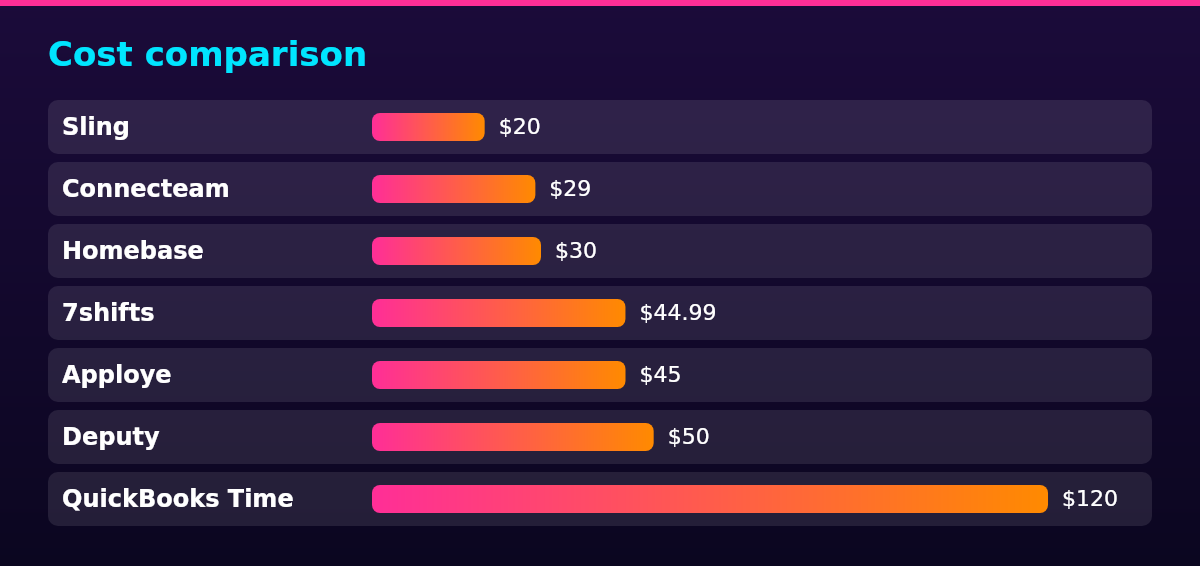
Cost comparison
| Tool | Plan used | How it scales | 10-person bill |
|---|---|---|---|
| Jibble | Free plan | $0 for unlimited users | $0 |
| Sling | Premium | $2 per user a month | $20 |
| Connecteam | Operations Basic | $29 flat for the first 30 users | $29 |
| Homebase | Essentials | $30 per location a month | $30 |
| 7shifts | Essentials | $44.99 per location a month | $44.99 |
| Apploye | Elite | $4.50 per user a month billed annually | $45 |
| Deputy | Lite | $5 per user a month billed annually | $50 |
| QuickBooks Time | Time Premium | $20 base plus $10 per user | $120 |
A 10-person team can also run free at three vendors: Connecteam’s free plan covers up to 10 users, Homebase’s Basic plan covers 10 employees at one location, and Jibble’s free plan has no user cap. Apploye’s free Starter plan covers 10 users but excludes scheduling, so it does not make this list. Sling’s free tier schedules up to 30 users but clocks time only from Premium, which is why it appears here at $20.
The billing basis matters more than the headline number. Connecteam’s $29 covers the first 30 users in one flat price, Homebase and 7shifts bill per location rather than per employee, and Apploye’s free Starter plan excludes shift scheduling, so the $45 shown is the entry point for a team that needs the roster. Every figure in the table comes from the plan prices quoted in the entries above, read from each vendor’s own pricing page on October 22, 2026.
Legal compliance in the US
US law shapes this purchase in two ways: the records the tool must produce, and the schedule rules it must help you follow. Under the Fair Labor Standards Act (FLSA), US employers must keep time cards, work and time schedules, wage rate tables and other wage-computation records for at least two years, and payroll records for at least three years, as the DOL’s record-keeping fact sheet summarizes from 29 CFR Part 516.
Oregon regulates the schedule itself for large employers. Its predictive work scheduling law, Oregon Revised Statutes (ORS) 653.412 to 653.485, covers retail, hospitality and food services establishments with 500 or more employees worldwide and requires a good-faith estimate of the work schedule, advance notice of the schedule, rest between shifts and compensation when the schedule changes, per the Oregon Legislature’s ORS chapter 653.
San Francisco’s Formula Retail Employee Rights Ordinances apply to formula retail establishments with at least 40 stores worldwide and 20 or more employees in the city, and regulate scheduling among other terms. Covered employers must also offer extra hours to existing qualified part-time staff before hiring new workers.
Philadelphia’s Fair Workweek law requires covered employers to give service, retail and hospitality workers a predictable work schedule (Phila. Code Chapter 9-4600). If your hourly people sit in those industries and those places, last-minute roster edits carry a price beyond the software.
A scheduling tool helps by timestamping every roster version and schedule change, but the duties stay with you as the employer. Geofenced clock-ins are the sharpest example: the punch record includes location, and the notice rules for workplace monitoring differ by state, so tell staff what the clock records before the first shift.
Scaling framework
Team size drives this choice more than any feature list: the free tiers hold a 10-person team, flat plans cover the 10 to 30 band, and per-seat plans take over from there.
1. Start on a free tier
Under 10 users, you pay nothing: Connecteam covers up to 10 users, Homebase covers 10 employees at one location, Sling schedules for free up to 30 users, and Jibble has no user cap.
2. Move to a flat-price plan
Between 10 and 30 users, flat pricing wins: Connecteam’s $29 covers the first 30 users, Homebase Essentials costs $30 per location with unlimited employees, and 7shifts Essentials costs $44.99 per location for up to 30 employees.
3. Switch to per-seat pricing
Above 30 users, per-seat plans scale predictably: Apploye runs $4.50 per user, Sling $2 and Deputy $5, so a 50-person team compares $225, $100 and $250 a month before any annual discounts.
4. Centralize compliance above 100 users
Across many sites at 100 users and up, look for multi-location compliance tools, biometrics time clocking and payroll integration, the territory of Deputy’s higher tiers and 7shifts Premium, and re-check which predictive scheduling laws apply in each state and city you schedule in.
FAQ
For a small business on shifts, Homebase is the strongest pick: its Basic plan covers one location with up to 10 employees for scheduling and time tracking at no cost, and payroll attaches for $49 a month plus $6 per employee paid. Teams that want phone-first clock-ins can take Connecteam’s free plan for up to 10 users instead. Both prices come from the vendors’ pricing pages in October 2026.
No single tool owns hourly scheduling; the names US employers shortlist typically include Deputy, Connecteam, Homebase and Apploye, with 7shifts for restaurants and Microsoft’s Shifts already inside Teams. Pick by team shape rather than by popularity, because each serves a different structure of shifts.
Yes. The Shifts app in Microsoft Teams includes a time clock that lets workers clock in and out of their shifts on mobile, desktop and web, per Microsoft’s Shifts documentation, and managers must turn the feature on in Shifts settings first.
The ten tools that cover this category are the eight compared above, Connecteam, Apploye, Deputy, Homebase, Sling, Jibble, 7shifts and QuickBooks Time, plus two more for specific needs. The two additions each serve a case the main list treats lightly: