

On this page
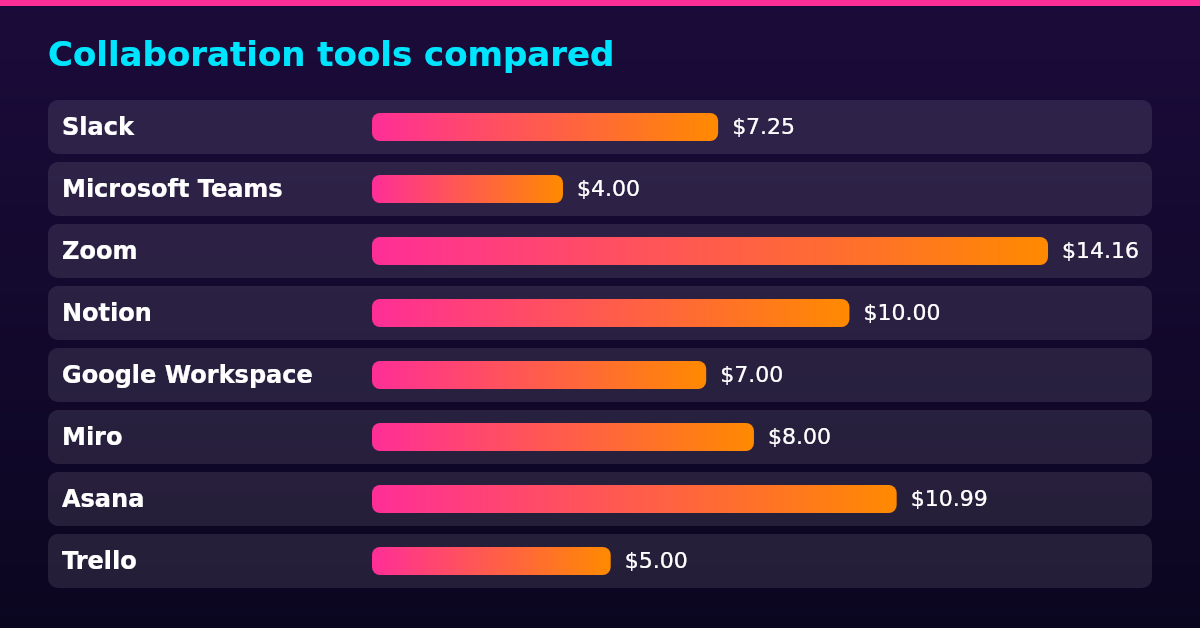
Remote collaboration tools are what a distributed team uses to work together: Slack and Microsoft Teams for messaging, Zoom for video meetings, Notion and Google Workspace for documents, Miro for whiteboarding, and Asana and Trello for project tracking. Paid plans cost $4 to $14.16 per user a month, billed yearly, on each vendor’s own pricing page. The picks below are judged on what an employer actually weighs: price per user, guest and contractor access, admin controls such as single sign-on (SSO) and data export, fit for async work across time zones, and data protection when team members’ data crosses borders.
Collaboration tools compared
| Tool | Category | Best for | Starting price (USD per user a month) | Billing |
|---|---|---|---|---|
| Slack | Messaging | Async chat in channels | $7.25 | Billed yearly |
| Microsoft Teams | Messaging | Companies already on Microsoft 365 | $4.00 | Paid yearly |
| Zoom | Video meetings | Reliable external and large calls | $14.16 | Billed yearly |
| Notion | Documentation | Docs, wiki and projects in one workspace | $10.00 | Billed yearly |
| Google Workspace | Documents | Gmail-first teams wanting one subscription | $7.00 | 1-year commitment |
| Miro | Whiteboards | Visual workshops across time zones | $8.00 | Billed yearly |
| Asana | Project tracking | Cross-team timelines and portfolios | $10.99 | Billed yearly |
| Trello | Project tracking | Simple kanban boards for small teams | $5.00 | Billed yearly |
Every price above is the tool’s entry paid plan at the yearly-billing rate its own pricing page published in October 2026; each entry below links that page, and monthly billing costs more where a vendor offers it.
Messaging tools
A team communication app is the tool a distributed team touches most, so async quality matters more than feature count: channels that hold decisions, threads that keep context, and response norms that do not assume everyone shares a time zone. Most distributed teams define core hours where everyone is online at once and let the rest of the day run async. Two team communication tools cover most employers.
Slack
Best for: teams that live in channels and want chat, huddles and app integrations in one place.
Slack organizes conversation into channels by project, team or topic, so decisions stay searchable instead of buried in one-to-one messages, and it connects to more than 2,600 apps in its directory. The tool only pays off when habits keep channels clean: the working rules in Slack best practices for remote teams come down to named channels, threads instead of direct messages and stated response windows.
Pro, the entry paid plan, currently costs $7.25 per user a month billed yearly ($8.75 billed monthly) on the Slack pricing page. It lifts the Free plan’s caps of 90 days of message history and 10 connected apps to unlimited, adds group huddles and lets members sign in with Google.
Pros
- Channel-based async chat that keeps decisions searchable
- More than 2,600 app integrations, including the project trackers below
- Pro includes unlimited message history, group huddles and sign-in with Google
Cons
- The Free plan caps message history at 90 days and apps at 10
- Costs more per user than Microsoft Teams Essentials ($4.00)
- Business+ ($15 per user a month billed yearly) needed for advanced admin controls
Microsoft Teams
Best for: companies already paying for Microsoft 365.
Microsoft Teams bundles chat, meetings, file sharing and real-time document co-authoring with the Microsoft 365 subscriptions many companies already pay for, and admin policies for sign-in, devices and data are set centrally once.
Teams Essentials, the standalone plan, currently costs $4.00 per user a month paid yearly on the Microsoft comparison page, with meeting recordings, transcripts and 10 GB of cloud storage per user. The Teams Premium add-on costs $10.00 per user a month paid yearly, and Microsoft 365 Business Basic at $7.00 per user a month paid yearly bundles Teams with the web versions of Word, Excel, PowerPoint and Outlook.
Pros
- Included with Microsoft 365 business plans, so often no new bill
- Essentials covers recordings, transcripts and 10 GB of cloud storage at $4.00 per user a month
- Central admin for policies, users and devices
Cons
- Office apps on the cheapest bundles are web and mobile only
- Premium features cost a $10.00 per user a month add-on
- Priced per user with an annual commitment
Video meeting tools
One video tool covers the meetings chat cannot replace: interviews, client calls and all-hands. Microsoft Teams and Google Meet both hold meetings too, and both appear in their own entries; the pick below is the one whose whole product is the meeting. The stack does not fix the meeting itself: virtual meeting etiquette comes down to a written agenda, cameras on for decisions and a decision log afterward.
Zoom
Best for: reliable external calls and large internal meetings.
Zoom keeps external meetings friction-free: guests join from a browser or phone without an account, and the call stays stable on weak connections, which is what distributed teams across regions notice first. Its whole product is the meeting, so features like local and cloud recording are built for the meeting workflow rather than added to a chat app.
Pro currently costs $14.16 per user a month billed annually on the Zoom pricing page. It lifts the Basic plan’s 40-minute group-meeting cap to 30-hour meetings with 10 GB of cloud recording per license, and Business at $18.33 per user a month raises the participant cap from 100 to 300.
Pros
- Guests join without an account, from a browser or phone
- 30-hour meetings and 10 GB of cloud recording on Pro
- Business tier raises capacity to 300 participants
Cons
- The highest entry price of the eight, $14.16 per user a month
- Basic caps group meetings at 40 minutes
- Documents and chat live in other tools
Documentation tools
Documentation tools do one job for a distributed team: they keep decisions readable for the person who was asleep in another time zone. The two picks split on shape: Notion is the wiki-first workspace, Google Workspace the Gmail-first subscription that wraps Docs, Drive and Meet together.
Notion
Best for: docs, wiki and lightweight projects in one workspace.
Notion puts documents, a wiki, databases and simple project boards in one workspace, so a new hire reads one place rather than three. Pages hold decisions, owners and dates inline, which is what makes the workspace work across time zones.
Plus currently costs $10 per member a month on yearly billing on the Notion pricing page, with unlimited file uploads and unlimited guests. Business at $20 per member a month adds SAML SSO and extends page history from 7 days on Free and 30 days on Plus to 90 days.
Pros
- Docs, wiki, databases and boards in one workspace
- Unlimited guests on paid plans, so contractors do not need seats
- Page history up to 90 days on Business
Cons
- The Free plan keeps only 7 days of page history
- Heavier to set up than a plain document folder
- AI features are metered, with credits billed beyond the trial
Google Workspace
Best for: Gmail-first teams wanting docs, meetings and storage in one subscription.
Google Workspace puts Gmail, Drive, Docs and Google Meet in one per-user subscription, so email, documents and video live under one admin console and one data policy. For a distributed team, a document link in a channel opens in the browser with no downloads and no version conflicts.
Business Starter currently costs $7 per user a month with a 1-year commitment on the Workspace pricing page, with 30 GB of pooled storage per user and Meet calls up to 100 participants but no recording. Business Standard at $14 per user a month adds recording, lifts Meet to 150 participants and raises storage to 2 TB, and Business Plus at $22 reaches 500 participants and 5 TB. These plans are sold for up to 300 users.
Pros
- Gmail, Docs, Drive and Meet under one admin and one price
- Recording and 150-participant calls from Business Standard at $14 per user a month
- Pooled storage scales across users rather than per seat
Cons
- Starter lacks Meet recording, the feature most teams need first
- Annual commitment required for the published prices
- Business plans cap at 300 users, so larger companies move to Enterprise pricing
Whiteboard tools
Whiteboard tools carry the workshops a distributed team cannot hold at one physical table: retros, user journeys and planning. One pick covers the job.
Miro
Best for: visual workshops and diagramming across time zones.
Miro runs an infinite canvas of boards for retros, flows, journey maps and workshops, with visitors editing a shared board without an account. That matters for distributed teams: a session recorded as a board survives for the time zone that missed it.
Starter currently costs $8 per member a month billed yearly on the Miro pricing page, and lifts the Free plan’s 3 editable boards to unlimited private boards. Business at $20 per member a month adds SAML SSO, and Enterprise, priced custom and sold from 30 members, adds data residency in the EU, the US, Australia or Japan.
Pros
- Unlimited private boards from the Starter plan
- Visitors can edit boards without an account
- Enterprise data residency options for teams with EU or EEA staff
Cons
- The Free plan caps editing at 3 boards with no guest role
- Enterprise features start at 30 members
- The Enterprise Guard security layer is priced separately
Project tracking tools
Project tracking is where remote work becomes accountable: one place shows who owns what and what is late. Project management for remote teams is mostly a choice between timeline depth and simplicity, and the two picks sit at those ends.
Asana
Best for: cross-team project tracking with timelines and portfolios.
Asana tracks work as tasks with owners and due dates, viewable as a list, a board or a timeline, so the same project reads cold for the manager skimming and the teammate executing. Portfolios roll many projects into one view for leads running several workstreams.
Starter currently costs $10.99 per user a month billed annually ($13.49 billed monthly) on the Asana pricing page, with unlimited free guests. Advanced at $24.99 per user a month adds the deeper reporting and admin controls, and the Personal plan is free for up to 2 users.
Pros
- List, board and timeline views of the same project
- Unlimited free guests for contractors and clients on Starter
- Personal plan free for up to 2 users
Cons
- The free plan covers only 2 users
- Advanced tier needed for heavier reporting
- Entry price more than double Trello’s Standard plan
Trello
Best for: small teams wanting simple kanban boards.
Trello keeps work on kanban boards where cards move from to-do to done, and almost nothing needs training. Its automation handles the repetitive moves, which is most of what a small distributed team needs from a tracker.
Standard currently costs $5 per user a month billed annually ($6 billed monthly) on the Trello pricing page, lifting the Free plan’s 10 boards per Workspace and 250 Workspace command runs a month to unlimited boards and 1,000 runs. Premium at $10 per user a month adds per-board views and admin controls.
Pros
- The simplest board setup of the eight
- 250 free automation runs a month
- Unlimited Power-Ups per board on the Free plan
Cons
- A guest on more than one board is billed as a member
- The Free plan caps boards at 10 per Workspace
- Atlassian Guard, which adds SSO, costs $4 per user a month on top
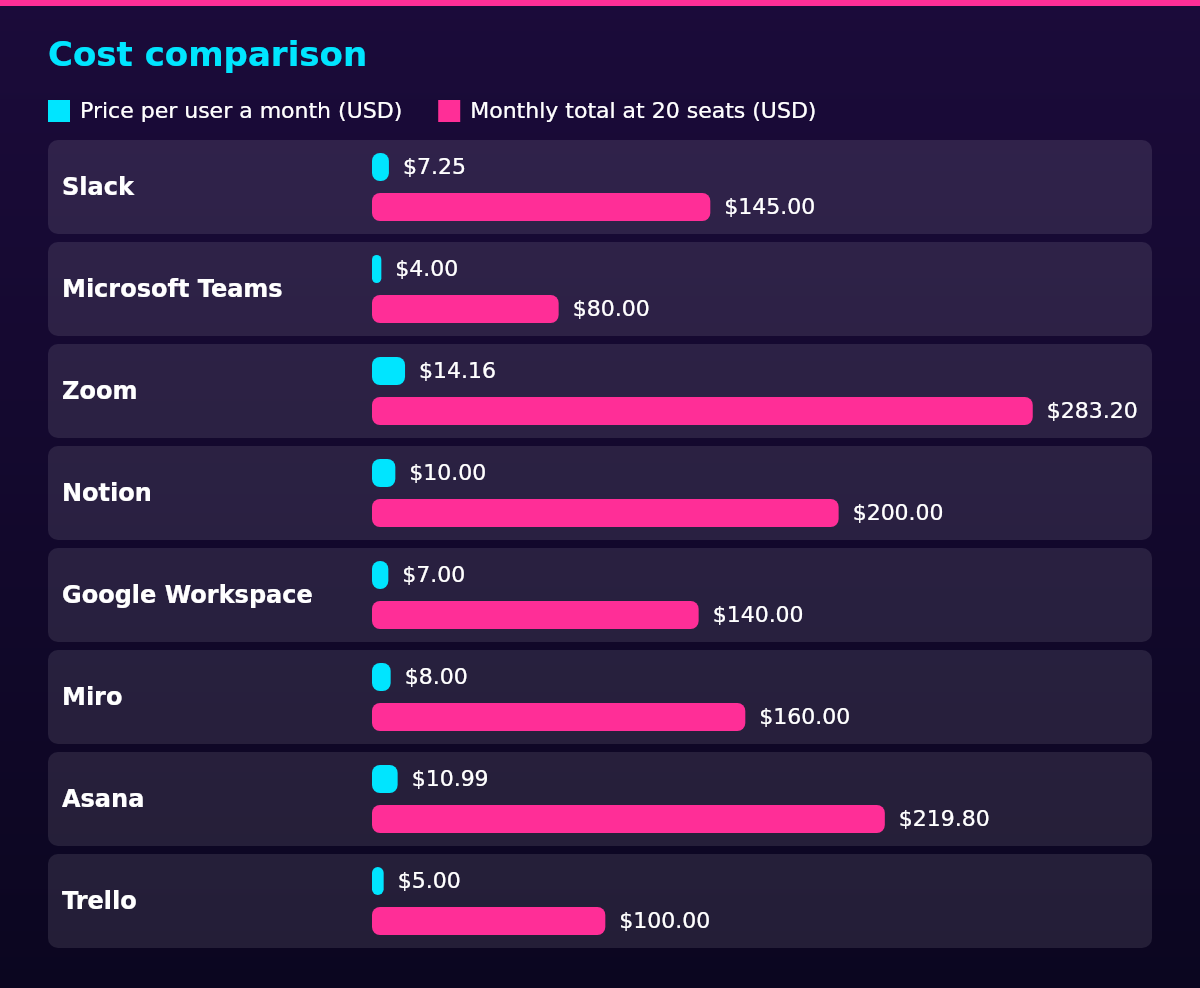
Cost comparison
| Tool | Plan used | Price per user a month (USD) | Monthly total at 20 seats (USD) |
|---|---|---|---|
| Slack | Pro | $7.25 | $145.00 |
| Microsoft Teams | Essentials | $4.00 | $80.00 |
| Zoom | Pro | $14.16 | $283.20 |
| Notion | Plus | $10.00 | $200.00 |
| Google Workspace | Business Starter | $7.00 | $140.00 |
| Miro | Starter | $8.00 | $160.00 |
| Asana | Starter | $10.99 | $219.80 |
| Trello | Standard | $5.00 | $100.00 |
A 20-person team currently pays $80 to $283.20 a month for any one of these tools at its entry plan, billed yearly. Buying separate tools for separate jobs adds fast: a stack of Slack Pro, Zoom Pro, Notion Plus and Asana Starter runs $42.40 per user a month, $848 a month at 20 seats.
The crossover point comes early. Microsoft 365 Business Basic and Google Workspace Business Starter each cover chat, meetings and documents for $7 per user a month, $140 a month at 20 seats, which is less than Slack Pro alone at $7.25 per user. A team buying two separate tools is already past the point where a bundle wins on price. What bundles do not cover is whiteboarding and project tracking, so the usual shape from 10 seats up is one bundle plus Miro or a tracker, not four separate subscriptions.
Legal compliance
Data protection rules reach remote work software the moment staff in the EU or EEA use it: the vendor processes their personal data on the employer’s behalf, and Article 28 of the EU General Data Protection Regulation (Regulation (EU) 2016/679) requires the employer, as controller, to use only processors that give sufficient guarantees and to bind them with a written contract. In practice that means checking the vendor’s data processing addendum before rollout and knowing where content sits: Miro’s Enterprise plan, for instance, stores data in the EU, the US, Australia or Japan at the customer’s choice.
US notice duties bite when a collaboration tool doubles as monitoring: presence indicators, activity feeds and dashboards can count as electronic monitoring. In Connecticut, an employer engaged in electronic monitoring must give employees prior written notice, with a civil penalty for missing it, under General Statutes § 31-48d.
Delaware has its own version: an employer monitoring email or Internet usage must give notice, either electronically on each day of access or once in writing, acknowledged by the employee, under 19 Del. C. § 705. The notice duty is jurisdiction-specific rather than national: state employee monitoring laws set their own requirements, so a team spread across states checks each one before switching a presence dashboard on.
Devices are the other half of the rule. When staff work from their own laptops, the employer’s control stops at the app: SSO and app-level policies can be enforced, but full device management needs the owner’s consent, the tradeoff in choosing personal devices over issuing company hardware.
Scaling framework
Remote team tools scale by headcount more than by features: under 10 people, free tiers carry most of the load. The caps are real but small teams rarely hit them: Slack Free keeps 90 days of message history, Miro allows 3 editable boards, Trello allows 10 boards per Workspace and Asana’s Personal plan covers 2 users. The one paid slot worth buying at this size is the tool the whole company touches daily, usually messaging.
From 10 to 50 people, buy the two tools the team complains about most, usually messaging and project tracking, and put single sign-on on the list before 30 seats, because per-seat passwords stop being manageable. The SSO tiers to budget for are Slack Business+ at $15 per user a month billed yearly, Notion Business at $20 and Miro Business at $20.
Past 50 people, admin features decide the stack more than price: SSO and SCIM provisioning, audit logs, data residency and legal holds. Miro Enterprise bundles residency from 30 members, and Slack Enterprise+ adds data-loss-prevention and legal-hold controls.
The stack still does not manage the team: managing a remote team means one-to-ones, written decisions and clear goals, and the tools only carry that work.
FAQ
Remote teams use one tool per job: Slack or Microsoft Teams for messaging, Zoom for video meetings, Notion or Google Workspace for documents, Miro for whiteboarding, and Asana or Trello for project tracking. Those eight are the shortlist employers actually choose between, with entry plans at $4 to $14.16 per user a month billed yearly.
The most common collaboration tools are Slack, Microsoft Teams, Zoom, Google Workspace, Notion, Miro, Asana and Trello, with email and shared drives underneath. Each is common because it owns one job: chat, meetings, documents, whiteboards or task tracking.
Slack is the best team communication app for async channel chat, and Microsoft Teams is the better fit for a company already on Microsoft 365. Slack Pro currently costs $7.25 per user a month billed yearly against Teams Essentials at $4.00 per user a month paid yearly, so the existing subscription usually decides.
There is no single best remote team collaboration tool, because the category is several jobs: Notion or Google Workspace for documents, Asana or Trello for tracking, and the messaging app your team will actually open. Choose per job rather than per brand, using the comparison table above.
The best remote team management tools are Asana or Trello for tracking, Slack or Microsoft Teams for communication, and a documentation hub like Notion for decisions. Management itself runs on one-to-ones, written decisions and clear goals, with the tools carrying the record.
Digital collaboration is people working on the same documents, decisions and conversations through software instead of a shared office. For a distributed team it means an editable document rather than an attachment, a channel rather than an email chain, and a board rather than a status meeting.
Remote collaboration tools cost $4 to $14.16 per user a month at the entry paid plans, billed yearly. A 20-person team pays $80 to $283.20 a month for any one tool, a four-tool stack of Slack, Zoom, Notion and Asana runs $848 a month, and a Microsoft 365 or Google Workspace bundle covers chat, meetings and documents for $140 a month at 20 seats.
No, not for a whole team: free tiers exist but cap the parts an employer notices first. The caps that bite: Slack Free keeps 90 days of message history and 10 apps, Zoom Basic caps group meetings at 40 minutes, Miro allows 3 editable boards, Trello allows 10 boards per Workspace, Asana’s Personal plan covers 2 users and Notion’s Free plan keeps 7 days of page history.