

On this page
Most teams that work entirely in cloud tools do not need a VPN for remote employees, because traffic to Google Workspace, Slack or a cloud HR system is already encrypted in transit. When you do need one, published per-seat prices currently run $5 to $14 per employee a month, and Cloudflare’s zero-trust tier is free for up to 50 users, so cost is rarely the reason to go without. You need a company VPN when staff have to reach systems that only exist on your private network, when a client, contract or industry rule calls for controlled access, or when the device itself has to be controlled. A VPN, short for virtual private network, is an encrypted tunnel from a device to your company network or to one internal system.
The decision turns on three questions: what your staff have to reach, who outside your company insists on controlled access, and what a seat costs. A rule for your industry can decide it for you, and one hire in a country that restricts VPNs can change the answer entirely. The sections below give the decision table, the per-seat costs from five vendors’ own pricing pages, the zero-trust alternative, the requirements for personal devices and a six-step setup.
When you actually need one
Remote employees need a VPN when they have to reach systems that only exist on your private network, or when a client, contract or industry rule calls for encrypted, controlled access from outside the office. Everything else on a modern stack, from email to file sharing, already ships with encryption in transit, so a tunnel adds nothing there. Match your situation in the first column of the table; the middle column makes the call and the last column says what to do about it.
| Your situation | Do you need a VPN | What it decides or what to do |
|---|---|---|
| Staff reach file servers, internal apps or databases on private network addresses | Yes | A remote-access VPN or zero-trust service is the only route in from outside |
| A client, bank or partner insists on traffic from a fixed, allowlisted IP address | Yes | A dedicated-IP or static-IP tier; NordLayer and GoodAccess sell these as add-ons |
| A rule for your industry calls for encrypted transit of regulated data | Check the rule | US health data, card payments and EU personal data are the usual triggers |
| Everything your team uses is SaaS over HTTPS | No | Multi-factor authentication and device hygiene cover more risk than a tunnel |
| Staff work from a country that restricts VPNs | Plan around it | China bars unauthorized VPNs, so pick access that works in that jurisdiction |
Two rows decide most real cases. If nothing lives on a private network and nobody outside your company insists on controlled access, multi-factor authentication (MFA) and device security cover more of the risk than a tunnel ever would. If either answer flips, you are buying remote access, and the only question left is which kind.
The allowlisted-IP row is the one employers forget until a bank portal or a client’s firewall rejects the home connection. What those services actually need is a fixed, dedicated exit address that never changes, and both NordLayer and GoodAccess sell one as an add-on rather than a plan change. That need alone justifies a business VPN even when everything else lives in the cloud.
What a VPN doesn’t cover
A VPN on its own is not enough for remote work security: it adds an encrypted tunnel and a route onto your network, and nothing else, so it does not secure the device, the login or the inbox. Phishing succeeds inside a tunnel as easily as outside one, which is why the CISA enterprise VPN security advisory tells organizations to warn teleworkers about phishing aimed at their credentials. An unpatched VPN server is itself an attack surface: the same advisory directs organizations to patch their VPNs and remote-access devices and to test capacity before the whole company depends on it.
No tunnel substitutes for MFA, and CISA advises organizations to require it on every VPN connection as well as on every login to the systems behind the tunnel. A VPN also does not manage, update or encrypt the device it runs on. If a laptop is already compromised, the tunnel carries the attacker’s traffic with the same protection it gives everyone else, so the tunnel is only ever one layer among several.
Business VPN vs zero trust
A business VPN puts every connected device onto the company network, while zero-trust network access (ZTNA) checks each request against the user’s identity and device and opens only the app asked for. NIST SP 800-207, the US standard that defines zero trust, treats access as a decision made per request and per resource, with no trust granted just because a device sits on the network. In practice, a contractor on a personal laptop can reach your ticketing system without ever joining the network itself.
A VPN fits teams that need whole-network access: legacy file shares, internal tools that assume an office LAN, and databases with private addresses. ZTNA fits per-app access, personal devices and outside contractors, because it grants one application instead of a network segment. Twingate, GoodAccess and Cloudflare sell zero-trust access and NordLayer sells network-layer access, and the per-seat prices for all four are in the cost table.
Hybrid setups are normal in practice: a mesh VPN for the engineers reaching servers, zero-trust access for a contractor using two internal tools, and nothing at all for a finance team that lives in the browser. Whether one console can run both kinds of access is a real difference between the vendors, worth checking against the cost table before anything is signed.
Requirements for personal devices
Whether remote employees should use a VPN on personal devices is a question of scope: grant app-level access rather than the whole network, and pair it with the controls you would put on a managed laptop. The BYOD vs company devices choice settles who owns the hardware and what you may install on it, and the requirements below assume the device stays the employee’s.
- Multi-factor authentication on every login to a company system
- A current operating system that still receives security updates
- Disk encryption switched on, with the recovery key held by the owner
- A company profile or container app rather than full-device mobile device management (MDM)
- Split tunneling, so personal traffic never crosses the company tunnel
- A plain statement of what you can see: destinations and volume, never personal-app content
Through the company VPN you can see which destinations a device reaches and how much traffic it sends. You cannot read personal-app content, and on a device the employee owns you should not try. Access rules of this kind are enforced at login, not by watching traffic afterward, which keeps the monitoring question inside the policy where it belongs.
What a business VPN costs
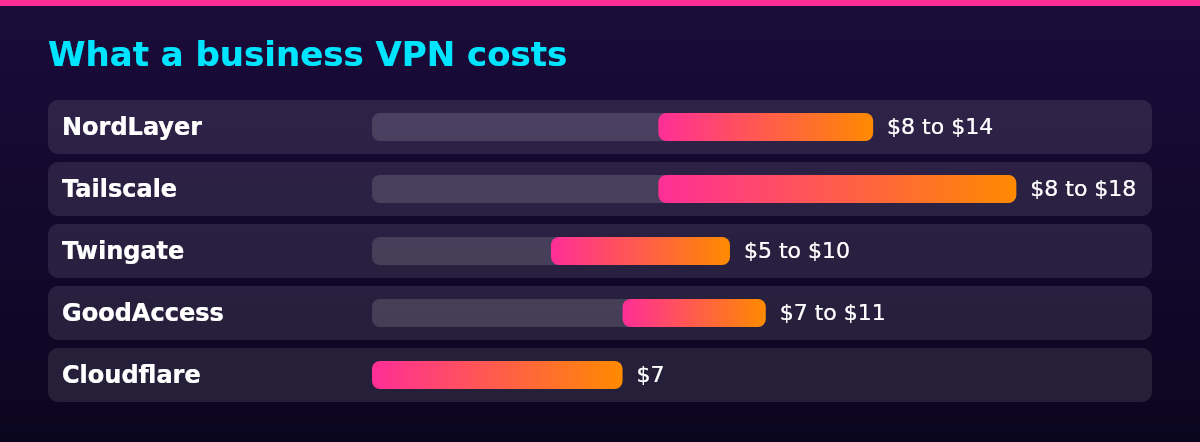
The published business VPN cost per user currently runs $5 to $14 a month across the main approaches, from Twingate’s printed Teams price at the bottom to NordLayer’s Premium tier at the top, and three vendors publish free tiers. Every figure in the table is the vendor’s own printed list price, read from its pricing page in October 2026, with the billing basis stated because several of these prices apply only on yearly or annual billing. Seat minimums, add-ons and the free-tier caps change the real bill more than the headline does.
| Provider | Approach | Price per user a month | Billing basis | Free tier |
|---|---|---|---|---|
| NordLayer | Remote-access business VPN | $8 to $14 | Monthly; up to 22% cheaper on yearly billing | None; 5-user minimum |
| Tailscale | WireGuard mesh VPN | $8 to $18 | Printed per user, per month | Up to 6 users |
| Twingate | Zero-trust access | $5 to $10 | Yearly billing | Up to 5 users |
| GoodAccess | Cloud VPN with static-IP whitelisting | $7 to $11 | Annual billing; $9 to $14 on monthly | None; 5-user minimum |
| Cloudflare | Zero-trust access | $7 | Pay-as-you-go above the free tier | Up to 50 users |
All three free tiers are usable by a business, with different caps: Cloudflare’s covers up to 50 users, Tailscale’s up to 6 and Twingate’s Starter up to 5. The caveat on Twingate’s sits in the terms rather than any use restriction, because its customer agreement lets Twingate end a free subscription at any time, for any reason, including account inactivity. The free tiers also skip the admin controls and support the paid plans carry, which makes them better for a pilot than for production.
NordLayer prints a dedicated-IP server gateway at +$40 a month on its pricing page, alongside a $2 per device monthly CrowdStrike endpoint add-on and an Enterprise offer from $6 a seat for teams over 200. A 14-day money-back window applies to its paid plans.
GoodAccess prints a dedicated gateway at $49 a month on its pricing page, and both GoodAccess and NordLayer set a 5-user minimum on their paid plans. A three-person team pays for five seats at either vendor, and Twingate’s Starter and Tailscale’s free tiers, which cover up to 5 and 6 users, give a team that size two zero-cost pilots.
Say you run a 10-person team on Twingate’s Teams plan at $5 per user a month, the yearly-billed price printed on its pricing page: that is $50 a month, or $600 across a year, with a 14-day trial available before any of it is due. The same 10 people on NordLayer’s Lite tier at $8 per user a month, billed monthly, cost $80 a month with no yearly commitment.
How to set it up
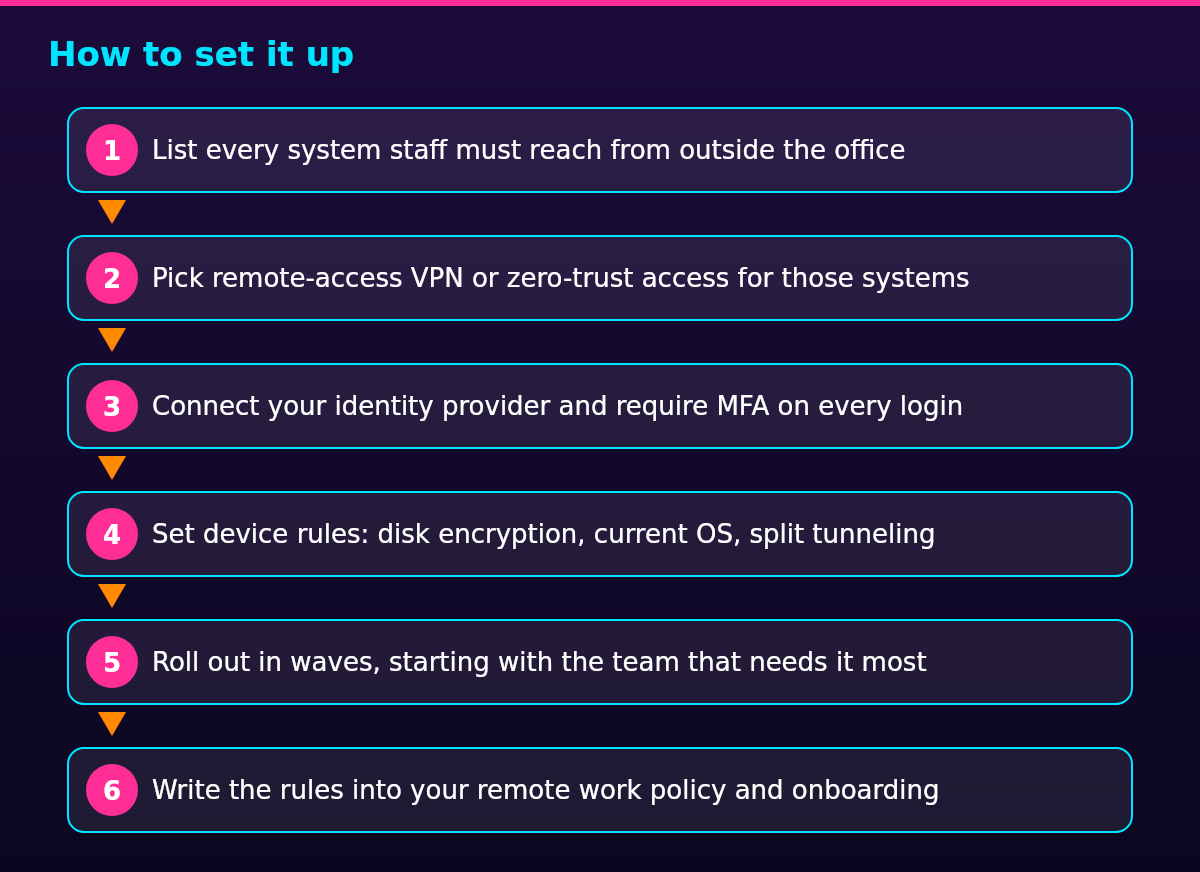
Setting up a VPN for remote employees is a six-step job that starts with what needs access, not with which tool to buy. CISA’s telework advisory frames the hard parts the same way: protect the access with MFA, patch whatever you expose, and test capacity before the whole company leans on it. The steps run in order because each one inherits the mistakes of the one before it.
- List every system staff must reach from outside the office
- Pick remote-access VPN or zero-trust access for those systems
- Connect your identity provider and require MFA on every login
- Set device rules: disk encryption, current OS, split tunneling
- Roll out in waves, starting with the team that needs it most
- Write the rules into your remote work policy and onboarding
Rolling out in waves beats a single launch, because each wave finds the devices, home networks and edge cases the plan missed. The sixth step is where hiring meets the tool: new hires get their access and MFA enrollment before day one, which is the job of a remote onboarding checklist rather than a support ticket on the first morning.
Rules that force the issue
Compliance does not require a VPN for remote work under any US federal rule, so what decides the question is sector-specific and contractual. The rules below are the ones that come up most for remote employers, each scoped to where it applies and linked at its source. None of them names a VPN; each one demands protection of regulated data in transit, which a VPN or a zero-trust service delivers in different ways.
In the US, covered entities and business associates handling electronic protected health information must guard that data against unauthorized access as it crosses a communications network, under 45 CFR 164.312(e)(1), the HIPAA Security Rule’s transmission-security provision. Encryption of transmitted health data is an addressable specification there, not a flat mandate, so a team routing patient data from home networks documents how it satisfies the rule and why.
Card payments bring in the PCI DSS standard for cardholder data, which calls for encryption whenever cardholder data travels over open, public networks, a category that includes home Wi-Fi. The standard reaches any organization that stores, processes or transmits card data, whatever its size. A payment terminal reached over a company VPN from a kitchen table sits inside that scope.
In the EU, controllers and processors of EU personal data must take appropriate technical and organizational measures to ensure a level of security appropriate to the risk, under Article 32(1) of the GDPR. The article names pseudonymization and encryption as measures to weigh, not a VPN requirement. In practice, an EU client contract that demands encrypted access to its systems settles the question before the law does.
An employee working from a country that restricts VPNs changes the plan entirely. Freedom House’s Freedom on the Net 2024 report on China records that the Ministry of Industry and Information Technology has banned unlicensed VPNs since 2017, that providers are barred from operating without government approval, and that users of unauthorized services face penalties. A company VPN bought in the US may simply not work for a hire in China, so the access method has to be whatever works in that jurisdiction, agreed with the employee in advance.
Put it in the policy
Whatever you require, write it into the remote work policy: which tool, who installs it, what it costs the employee (nothing), what you can see through it, and the MFA rule. The VPN requirement sits in the HR policy for remote workers next to the device rules it depends on, and setting it is one of your responsibilities as a remote employer, not an IT side project.
Say plainly what company access reveals: the VPN shows which destinations a device reaches and how much traffic it sends, and on a company-owned device it shows more. An employee who learns that during onboarding has no reason to learn it from a forum thread two years later. The policy is where that trust question gets answered once, in writing, instead of case by case.
FAQ
No, not when every tool the team uses is a cloud service, because that traffic is already encrypted in transit. A company VPN becomes necessary when staff have to reach systems on a private network, or when a client, contract or industry rule calls for controlled access. The decision table near the top settles which situation applies.
No, not if all the work happens in cloud tools, because the browser already encrypts that traffic. A VPN is worth setting up from home only for reaching systems that sit on the company’s private network, or where an employer or a client asks for one. An employer that wants one supplies it and pays for it.
Yes: the employer that runs the VPN can see which destinations the device reaches and how much traffic it sends, and on a company device it can see more. A VPN hides that activity from the internet provider and the coffee-shop network, not from the company whose tunnel it is. Personal traffic stays outside the tunnel under split tunneling.
Yes, VPN use is legal in the US and in most countries. China is the worked example of restriction: its Ministry of Industry and Information Technology has banned unlicensed VPNs since 2017, and users of unauthorized services face penalties, per Freedom House’s 2024 country report. An employer with staff there plans access around the restriction rather than through it.
There is no single best VPN for remote workers, because the right tool depends on what has to be reached. Full network access and legacy systems point to a business VPN; per-app access, personal devices and outside contractors point to zero trust. The cost table, with prices from five vendors’ own pages, is the honest starting comparison.