

On this page
The Slack vs Microsoft Teams decision for a remote team usually comes down to the software stack the company already pays for. Microsoft 365 Business Basic through Premium all include Teams, so a company on that suite gets chat, files, meetings and collaboration inside one bill, while Slack Pro currently costs $7.25 per user a month billed annually, per Slack’s pricing page. Pick Teams when chat, video meetings of up to 1,000 people, contractor access as directory guests, file collaboration and app integrations should run inside the Microsoft 365 admin plane. Pick Slack when the remote team is chat-first and async across time zones, working with other companies in shared channels, threads and huddles instead of calls.
Slack and Microsoft Teams differ on price per seat, guest and external access for contractors, huddles versus scheduled meetings, threads for async work across time zones, and message retention and compliance controls.
Slack vs Microsoft Teams compared
| Slack | Microsoft Teams | |
|---|---|---|
| Starting price | Free plan with 90 days of message history; Pro currently $7.25 per user a month billed annually | Standalone Teams Essentials plan, or Teams included in Microsoft 365 Business Basic and above |
| Top paid tier | Business+ at $15 and Enterprise+ currently at $45 per user a month, both billed annually | Teams Enterprise, a separate SKU for new enterprise customers since April 1, 2024 |
| Message history | 90 days on Free, unlimited on every paid plan | Chats and channel messages kept or deleted under admin-set retention policies |
| Meetings | Huddles with audio, video and screen sharing inside channels | Full meetings up to 300 people on business plans, up to 1,000 on E suites |
| External people | Guest roles plus Slack Connect channels shared with up to 250 organizations | Guest accounts in Microsoft Entra ID with any email, plus external chat with other Microsoft 365 organizations |
| Compliance controls | Data residency from Business+ up; HIPAA support and legal holds on Enterprise+ | Purview retention policies, e-discovery and conditional access for guests |
| Best for | Chat-first, async teams that work with other companies | Companies already running on Microsoft 365 |
Slack’s column reads from its own pricing page: the Free plan carries 90 days of history and up to 10 apps, Pro is currently $7.25 per user a month billed annually, Business+ is $15, Enterprise+ is currently $45, and every paid plan includes unlimited message history.
The Teams column reads from Microsoft’s own licensing documentation: Teams Essentials exists as a standalone plan with Microsoft Entra ID, the Business suites that include Teams are capped at 300 users, and since April 1, 2024 new enterprise customers buy Teams Enterprise as a separate SKU alongside a suite without Teams.
External access for contractors
Both platforms let outside people in, but through different doors: Slack scopes a guest to named channels inside the workspace, while Teams issues every guest a directory account the company’s admins govern.
Slack defines two guest roles for exactly this case, Single-Channel Guest and Multi-Channel Guest, and its paid tiers support guests, per its permissions by role page. A contractor lands in the workspace with access scoped to the channels you name and nothing else.
For whole outside companies, Slack Connect shares a channel with up to 250 organizations including your own; people see only the channels they were invited to, and external people cannot be added to the workspace’s default general channel.
Teams takes the directory route: anyone with a business or consumer email account, an Outlook or Gmail address for example, joins as a guest whose account is created in Microsoft Entra ID, Microsoft’s cloud identity service, and is covered by the same compliance and auditing protections as other users, per Microsoft’s guest access documentation. Conditional access and multifactor authentication can be enforced for guests at organization, app or user level, and shared channels are the alternative that needs no guest account in the directory.
Teams also carries external access for people outside the organization who use Microsoft identities: chat and meetings with people at other Microsoft 365 organizations, and chat only with Skype users, with the settings on by default, per Microsoft’s external access documentation.
For contractors the tradeoff is plain: Slack keeps them in the workspace with channel-scoped access and no directory overhead, while Teams gives them a governed identity your admins can lock down with the same policies as employees.
Huddles vs Teams meetings
Slack huddles and Microsoft Teams meetings are built for different jobs: huddles are lightweight audio and video rooms that start inside a conversation, while Teams meetings are full calendar meetings whose size cap depends on the plan. Slack’s pricing page describes huddles as the way to “work together in real time through audio and video meetings (including screen sharing)”.
The meeting caps set the ceiling: with Microsoft 365 Business Basic, Business Standard, Business Premium or Teams Essentials, a meeting hosts up to 300 people, and with E1, E3 or E5 suites the limit rises to 1,000, per Microsoft’s limits page.
For a distributed team the split is overlap versus schedule. Huddles suit quick unscheduled questions while two time zones share working hours; scheduled syncs, recorded demos and all-hands are the territory of full meetings, the kind most remote teams run through video conferencing software.
Whoever hosts them, meeting etiquette across time zones decides whether a recurring sync earns its calendar slot: a shared agenda beforehand and a written recap afterward carry the people who could not join live.
Threads for async work
Slack treats threads as the default home of side conversation: replies collect under the original message and the channel stays readable. Teams keeps the channel feed as the main view, where replies are optional, and runs one-to-one and group chats alongside it.
Across time zones that difference decides whether a decision is findable a day later. Teams that overlap only during agreed core hours need conversation outside the window to carry its own context, and a thread keeps the question, the answer and the attached file in one place without a live call.
Teams has its own chat guardrails: in private group chats with more than 20 people, calling, sharing, typing indicators and read receipts switch off, per Microsoft’s limits page.
Message retention
Slack caps its Free plan at 90 days of message history and includes unlimited history on every paid plan, per its pricing page.
Teams chats and channel messages are retained or deleted through Microsoft Purview retention policies that admins set, and shared channels inherit the parent team’s settings; e-discovery runs through the same Purview estate.
Deleted Teams channels can be restored within 30 days, per Microsoft’s limits page, which gives a short recovery window on top of whatever retention policy the admins set.
Slack’s heavier record-keeping controls arrive with the paid tiers: data residency is included from Business+ up, and legal holds ship only with Enterprise+, currently $45 per user a month billed annually, per its pricing page.
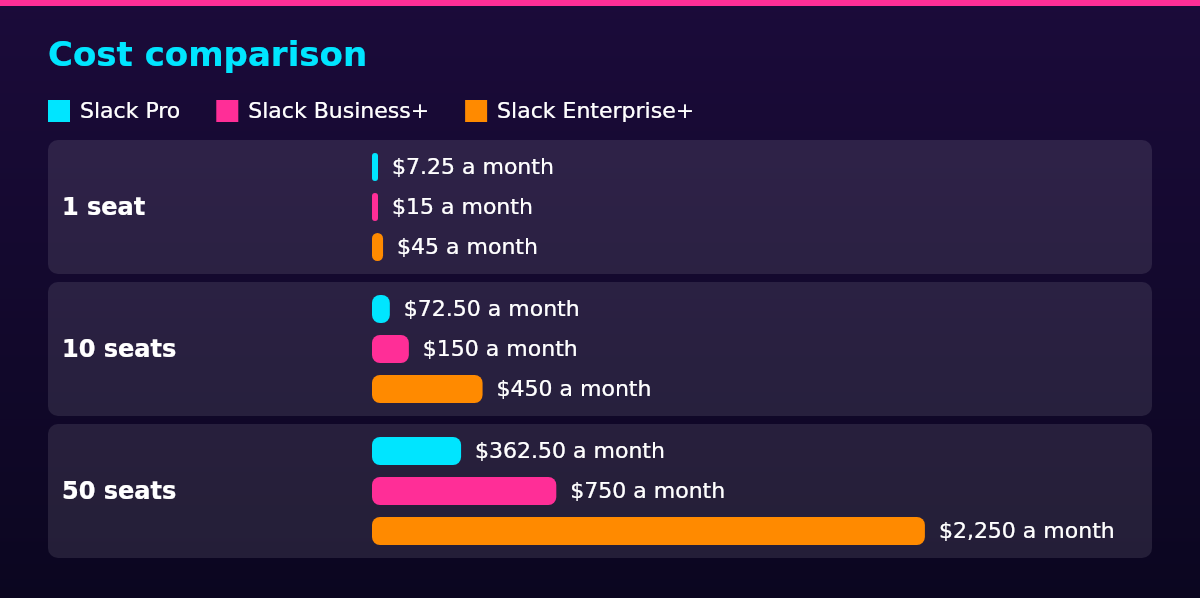
Cost comparison
| Team size | Slack Pro | Slack Business+ | Slack Enterprise+ | Microsoft Teams |
|---|---|---|---|---|
| 1 seat | $7.25 a month | $15 a month | $45 a month | Teams Essentials standalone, or a Microsoft 365 Business suite |
| 10 seats | $72.50 a month | $150 a month | $450 a month | Same plans, with per-seat pricing on Microsoft’s own plans page |
| 50 seats | $362.50 a month | $750 a month | $2,250 a month | Same plans, with per-seat pricing on Microsoft’s own plans page |
The Slack column is arithmetic from Slack’s pricing page, using its currently published rates: Pro at $7.25 per user a month on annual billing ($8.75 billed monthly), Business+ at $15 ($18 monthly) and Enterprise+ at $45, multiplied by seats. A 10-seat team pays $72.50 a month on Pro, $150 on Business+ and $450 on Enterprise+.
The Microsoft Teams column carries plan names, not dollars: Teams Essentials is the standalone plan, and Teams ships inside Microsoft 365 Business Basic, Standard and Premium, each capped at 300 users, per Microsoft’s licensing documentation.
No per-seat Microsoft Teams pricing could be verified at the time of writing, so none is quoted here; Microsoft lists the current prices for Essentials and the suites on its own Teams plans page.
For a company already paying for Microsoft 365, chat adds no second bill, and that is usually the deciding number in this comparison. A 50-person company on Slack Pro pays $362.50 a month for chat on top of whatever it pays for documents and email; the same 50 people on a Microsoft 365 Business plan get chat inside the suite bill.
The unbundling changes that arithmetic for the biggest buyers: since April 1, 2024, new enterprise customers buy Teams Enterprise as a separate SKU next to a suite without Teams, and in the European Economic Area and Switzerland the split has applied since October 1, 2023, per Microsoft’s licensing documentation. Customers subscribed before April 1, 2024 keep, renew and upgrade their bundled plans as before.
Legal compliance
In the European Union, chat content in Slack or Microsoft Teams about identifiable people is personal data, so the EU’s General Data Protection Regulation (GDPR) applies its rules on lawful basis, transparency and international transfers, and data residency, where messages are stored, becomes a buying criterion. The official GDPR text sets those duties for every organization processing personal data in the EU.
Both vendors answer that pressure differently: Slack includes data residency from Business+ up, starting at the published $15 per user a month, per its pricing page, while Microsoft Teams data stays inside the Microsoft 365 tenant the company already governs.
The Teams unbundling is a European fact first: in the European Economic Area and Switzerland, enterprise customers have bought Teams separately from the suites since October 1, 2023, ahead of the worldwide April 1, 2024 change, per Microsoft’s licensing documentation.
In the United States, no federal rule mandates a chat platform, so the practical questions are export, retention and how well chat records hold up in e-discovery. For employers covered by HIPAA, the US health data privacy law, Slack lists HIPAA support only on its Enterprise+ tier, per its pricing page.
Scaling framework
As a remote team grows, the sensible choice between Slack and Microsoft Teams changes with headcount: Slack steps up through Pro, Business+ and Enterprise+, while Teams rides Microsoft 365 suites capped at 300 users, per Microsoft’s licensing documentation, and becomes a separate SKU beyond that.
- Under 10 seats: Slack Free carries a small team with 90 days of history and up to 10 apps, per Slack’s pricing page; Teams Essentials is the standalone entry if chat is all you need from Microsoft.
- 10 to 50 seats: Slack Pro at $7.25 per user a month billed annually, or a Microsoft 365 Business Basic bill that already includes Teams and usually wins this band on total cost.
- 50 to 300 seats: Slack Business+ adds single sign-on and tighter data controls at $15 per user a month, while Business Standard and Premium stay in play on the Teams side.
- More than 300 seats: past the suite cap, new enterprise customers buy Teams Enterprise as a separate SKU, per Microsoft’s licensing documentation, and Slack Enterprise+ (currently $45 per user a month billed annually) is where HIPAA support and legal holds land; data residency arrives earlier, from Business+ up.
At every stage the platform is the smaller half of the decision: how you manage a remote team, from onboarding to meeting rhythm to written norms, shapes the outcome more than the chat tool does.
Which should you pick?
A remote team should use Microsoft Teams if the company already pays for Microsoft 365, and Slack if it does not. The Microsoft Teams vs Slack question turns on the invoice first: a company on Microsoft 365 already owns Teams chat, so adding Slack means a second chat bill.
Pick Microsoft Teams if the company runs on Microsoft 365 and wants chat, files and meetings in one bill and one admin plane, needs meetings up to 1,000 people on an E suite, or wants contractors handled as Entra ID guests with multifactor authentication.
Pick Slack if the team is chat-first and async, works with other companies in shared channels, wants huddles instead of scheduled calls for quick overlap, or wants per-seat pricing without buying a suite.
If Slack wins, the tool still needs running: channel structure, naming conventions and etiquette, the habits in Slack best practices for remote teams, decide how much of the platform’s value the team actually gets.
FAQ
Yes, one of the two: use Microsoft Teams if the company already pays for Microsoft 365, and Slack if the team is chat-first, thread-heavy or works with other companies in shared channels. Teams wins on the bundled bill and one admin plane for chat, files and meetings; Slack wins on async threads, huddles and Slack Connect. Under enterprise scale both are modest per seat, so the existing stack decides.
Microsoft Teams reaches more users because it ships inside Microsoft 365, though Microsoft publishes no seat count that could be verified here. Slack reports more than 200,000 paid customers and says 77 of the Fortune 100 use Slack, with daily active users in more than 150 countries, per its about page.
No: if you already pay for Microsoft 365, Teams chat adds no second bill, so Slack costs more on top; without the suite, Slack Pro currently costs $7.25 per user a month billed annually, per Slack’s pricing page. No per-seat Teams price could be verified at the time of writing, so the honest Teams cost is either zero extra inside an existing suite or the price of a Microsoft 365 plan bought for other reasons.
Yes: Teams channels, chat and message threads cover the same core jobs as Slack channels, direct messages and threads. The differences are the defaults: Slack leans on threads for side conversation and huddles for quick calls, while Teams leans on channel posts, separate chats and full meetings.
Yes: Slack reports more than 200,000 paid customers, 77 of the Fortune 100 and daily active users in more than 150 countries, per its about page, and Salesforce bought the company in 2021.
A company would pick Slack over Teams for thread-first async conversation, shared channels with other companies through Slack Connect, huddles for quick unscheduled calls, and per-seat pricing that does not require a software suite. It gives up the single Microsoft 365 bill and the directory-governed guest model in exchange.