

On this page
Zoom alternatives are video conferencing tools a team uses instead of Zoom for meetings, and the six best Zoom alternatives for a remote team are Microsoft Teams and Google Meet inside the office suite the company already pays for, Cisco Webex when security and admin controls decide, Zoho Meeting and Jitsi Meet when price leads, and Loom when the meeting should be a recording instead of a live call. Plans currently run from free to $18 a month, against Zoom Pro’s $14.16 per user a month billed annually, with Zoom’s free plan capping group video calls at 40 minutes as the baseline. The six Zoom alternatives below are compared on meeting length, participant caps, recording, async video, time-zone scheduling, admin controls and price per host.
Zoom alternatives compared
| Tool | Best for | Starting price (USD, per host or per user a month, annual billing where published) | Vs Zoom’s limits |
|---|---|---|---|
| Microsoft Teams | Companies already paying for Microsoft 365 | Plan prices sit on Microsoft’s own comparison page | 300 participants on business plans against Zoom Pro’s 100 |
| Google Meet | Teams already on Google Workspace | $7.00 per user a month on Business Starter | 24-hour meetings on every plan against Zoom Basic’s 40 minutes |
| Cisco Webex | Security-conscious and regulated teams | $12.00 per user a month on Webex Meet | 200 attendees at $12 against Zoom Pro’s 100 at $14.16 |
| Zoho Meeting | Small teams that need recording for a few dollars a host | US$1 to US$10 per host a month on the Standard plan | A US$1 host license against Zoom Pro’s $14.16 |
| Jitsi Meet | Teams that want full data control without a subscription | $0, open source | No published time or participant caps against Zoom Basic’s 40 minutes |
| Loom | Teams that want fewer meetings, not a different app | $18 per user a month on Business | Replaces the meeting with a recording instead of hosting it |
Those starting prices are per host or per user, not per attendee, and each vendor’s annual-billing figure is used where both monthly and annual prices are published; the entries below link every vendor’s own pricing page. The platform swap changes the caps and the bill, not the meetings themselves: short agendas and camera norms come from virtual meeting etiquette, not from the software. A team choosing meeting software for a new setup rather than switching away from Zoom has a wider field of video conferencing software to compare, Zoom included.
The suite you already pay for
If the company already pays for Microsoft 365 or Google Workspace, Microsoft Teams or Google Meet are effectively already bought: both suites ship a meeting tool, and the only new question is which plan tier covers the team’s meetings.
Microsoft Teams
Best for: companies already paying for Microsoft 365
Microsoft Teams comes with the Microsoft 365 plans many companies already run, so a team paying for the suite can use a meeting tool it owns rather than adding a Zoom bill next to it. It suits teams that want meetings, chat and file sharing in one place, with admin controls managed in the same console as the rest of the suite.
Microsoft’s prices for Teams Essentials and the Microsoft 365 Business Basic, Business Standard and Business Premium plans sit on Microsoft’s own Teams comparison page. That page was not readable for an independent price check on 2026-10-16, so the plans are named here and the dollar figure is left to Microsoft’s page.
On the meeting limits, Microsoft’s specifications page caps Teams meetings and events at 30 hours, allows up to 300 participants on the business plans named above and up to 1,000 on enterprise E and F plans, and limits each meeting recording to 4 hours or 1.5 GB per file.
Pros
- Included with Microsoft 365 plans the company may already run
- Up to 300 participants on business plans against Zoom Pro’s 100
- 30-hour meeting limit
- Meetings, chat and admin controls in one console
Cons
- Its value depends on already paying for Microsoft 365, and the standalone price needs Microsoft’s comparison page
- Meeting recordings stop at 4 hours or 1.5 GB per file, then restart as a new file
Google Meet
Best for: teams already on Google Workspace
Google Meet ships with every Google Workspace plan, so a team on Workspace already owns its Zoom alternative. Its gallery and speaker views suit hybrid meetings where part of the team shares a room and the rest joins remotely.
Google Workspace pricing currently lists Business Starter at $7.00, Business Standard at $14.00 and Business Plus at $22.00 per user a month billed annually, with a 24-hour meeting cap on every plan. Participant caps rise with the plan: 100 on Starter, 150 on Standard and 500 on Plus, and recording is included from Business Standard upward, so a Starter team that needs recordings has to move up a tier.
Pros
- 24-hour meetings on every plan against Zoom Basic’s 40 minutes
- Recording included from Business Standard upward
- Participant caps scale to 500 on Plus and 1,000 on Enterprise
- Calendar, chat and documents in the same workspace
Cons
- Billed per user for the whole team, not per host
- No recording on Business Starter
- Priced as the whole Workspace subscription if the team is not already on it
The security-led choice
The most secure Zoom alternative for a regulated team is a dedicated meeting platform rather than a suite’s bundled tool, and in this list that platform is Cisco Webex, decided by compliance review, admin control and data governance.
Cisco Webex
Best for: security-conscious and regulated teams
Cisco Webex is a dedicated meeting platform licensed per user, with the admin, security and compliance settings a regulated employer looks for. A team that needs a meeting tool it can configure and govern separately from its office suite is the fit here.
Webex pricing currently lists Webex Meet at $12.00 per user a month billed annually, $144 a user a year, with unlimited meetings up to 24 hours, up to 200 attendees and 10 GB of cloud recording. The free tier allows unlimited meetings up to 40 minutes each with up to 100 attendees and local recording, and the page’s current offer gives 6 months free when buying 5 or more licenses (read 2026-10-16). Webex Suite, which adds calling, is $22.50 per user a month billed annually.
Pros
- 200 attendees on Webex Meet against Zoom Pro’s 100
- 24-hour meetings on the paid plan
- 10 GB of cloud recording
- A free tier with unlimited meetings at 40 minutes each
Cons
- Licensed per user, so the cost grows with every person who runs meetings
- The 6-months-free offer requires 5 or more licenses
- Webex Suite pricing adds calling features a meetings-only team does not need
Cheaper standalone meeting platforms
The cheapest Zoom alternatives for a small team cut the bill two ways: a cheap per-host license (Zoho Meeting) or self-hosting with no subscription at all (Jitsi Meet).
Zoho Meeting
Best for: small teams that need recording for a few dollars a host
Zoho Meeting is a standalone meeting tool priced per host rather than per user, the shape that most undercuts a per-user Zoom bill on a small team. It fits teams that run a few meetings a week, want the recordings kept, and do not want suite prices for them.
Zoho Meeting’s pricing page currently lists a free plan with up to 100 participants and meetings up to 60 minutes, and the paid Standard plan from US$1 to US$10 per host a month billed annually, tiered by participant count. Paid plans run meetings up to 24 hours and include 5 GB of cloud recording per host, and the Professional plan (US$3 to US$15 per host a month billed annually) adds custom domains, breakout rooms and recording transcripts. Toll-free dial-in numbers cost US$192 a year per organization as an add-on.
Pros
- The Standard plan starts at US$1 per host a month billed annually
- 5 GB of cloud recording per host
- A free tier with up to 100 participants and 60-minute meetings
- 24-hour meetings on paid plans
Cons
- The per-host price rises with the participant tier, so the bill grows with meeting size
- Toll-free dial-in numbers cost US$192 a year per organization
- Breakout rooms and transcripts need the Professional plan
Jitsi Meet
Best for: teams that want full data control without a subscription
Jitsi Meet is completely free video conferencing, open source, and it can launch on servers the team controls, so recordings and meeting data stay on infrastructure the employer owns. It fits teams with someone who can run the servers and wants full data control, and it publishes no meeting time or participant caps of its own.
Pros
- Free, with no per-host or per-user license
- Open source, so the code can be audited
- Self-hosting keeps recordings and meeting data on the employer’s own servers
Cons
- Self-hosting means buying, running and updating the servers
- No published meeting or participant caps, so the team has to load-test its own setup
- Fewer admin and integration features than the commercial tools in this list
Async video instead of meetings
The other answer to what a remote team can use instead of Zoom for meetings is fewer meetings: updates, demos and walkthroughs become recordings that people watch on their own schedule. Scheduled meetings cluster inside overlap hours, so the people outside those core hours get the update without joining a call at an awkward time.
Loom
Best for: teams that want fewer meetings, not a different meeting app
Loom is async video messaging, not live meetings: a team member records the screen and camera once, and the rest of the team watches when their day allows. It replaces the recurring update and demo meetings that pull people in across time zones, and it fits a team whose real problem is meeting load rather than meeting software.
Loom’s pricing page currently lists the Starter plan at $0 with up to 25 videos per person and 5-minute screen recordings, and the Business plan at $18 per user a month with unlimited recording length; the page says that plan costs 17% less billed annually. Up to 50 people can join a workspace as free Creator Lite members, and the Business + AI plan costs $24 per user a month.
Pros
- Viewers join free as Creator Lite members
- Recordings replace recurring update meetings across time zones
- A Starter plan at $0 for a small team
Cons
- No live meetings at all, so it replaces meetings rather than hosting them
- Per-user pricing, with every person who records needing a paid seat
- The free plan caps screen recordings at 5 minutes
Cost comparison
| Tool | Plan used | Price basis | Monthly total (USD) |
|---|---|---|---|
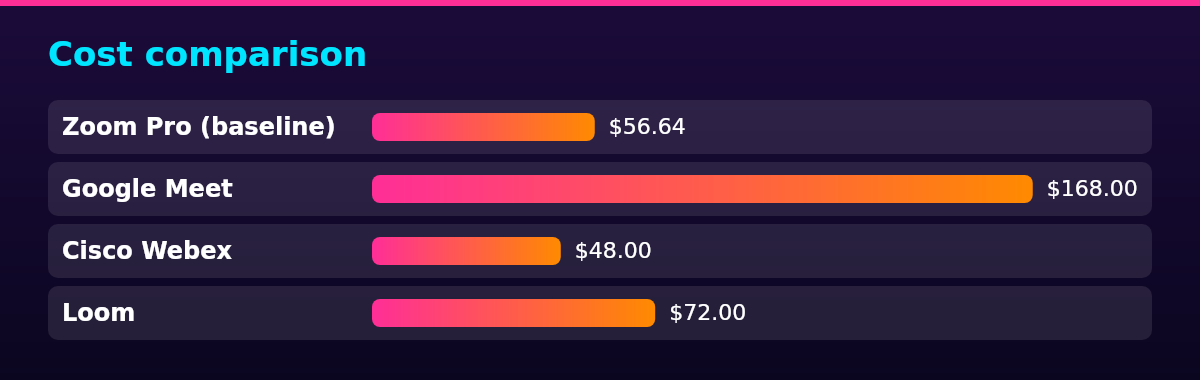
| Zoom Pro (baseline) | Pro | $14.16 per user a month billed annually, 4 hosts | $56.64 |
| Microsoft Teams | Teams Essentials or Microsoft 365 Business | Plan prices on Microsoft’s comparison page | Read on Microsoft’s page |
| Google Meet | Workspace Business Standard | $14.00 per user a month billed annually, 12 users | $168.00 |
| Cisco Webex | Webex Meet | $12.00 per user a month billed annually, 4 hosts | $48.00 |
| Zoho Meeting | Standard | US$1 to US$10 per host a month billed annually, 4 hosts | US$4 to US$40 |
| Jitsi Meet | Self-hosted | No license fee | $0 plus the team’s own server costs |
| Loom | Business | $18 per user a month, 4 creators | $72.00 |
The example team is 12 people, 4 of whom run meetings and need a paid seat or host license. On that shape, Zoom Pro at $14.16 per user a month billed annually comes to 4 licenses, $56.64 a month, before add-ons.
If the company already pays for Microsoft 365 or Google Workspace, Meet or Teams add no new line item: the meeting tool ships inside the subscription. Google Workspace Business Standard currently costs $14.00 per user a month billed annually, so the 12-person team pays $168.00 a month, the tier the Meet row prices because recording starts there. On Business Starter at $7.00 per user, the same team pays $84.00 a month but has no meeting recording.
The Teams row leaves its figure to Microsoft’s own comparison page, because that page was not readable for an independent check on 2026-10-16 and no secondhand number is quoted.
Cisco bills Webex Meet per user: 4 licenses at $12.00 per user a month billed annually come to $48.00 a month.
Zoho Meeting bills per host, and the participant tier sets the price: 4 Standard hosts currently cost US$4 to US$40 a month at US$1 to US$10 per host a month billed annually, and toll-free dial-in numbers add US$192 a year per organization.
Loom bills only the people who record: 4 creators at $18 per user a month come to $72.00, and the other 8 people watch free as Creator Lite members. The Business + AI tier costs $24 per user a month.
Jitsi Meet carries no license fee, so its row is $0 plus whatever the self-hosted servers cost.
The add-ons that move real bills are participant capacity and dial-ins: Zoom’s Large Meeting add-on lifts a meeting past the Pro plan’s 100 participants, and Zoho’s toll-free numbers are the example above.
Below four hosts, the free tiers compete directly on their caps: Zoom Basic stops group meetings at 40 minutes, a cap Webex’s free tier shares, with Zoho’s free plan allowing meetings up to 60 minutes.
Legal compliance
Whether it is legal to record meetings on Zoom or on any of these alternatives turns on recording-consent law. In the United States, the federal baseline is one-party consent: under 18 U.S.C. § 2511, intercepting a wire, oral or electronic communication is lawful when at least one party to it consents.
State law can require more, so a team recording meetings across the US checks each state its members work from. In Washington, it is unlawful to intercept or record a private communication without first obtaining the consent of all the participants, so a meeting with a team member there needs everyone’s consent before recording starts.
Florida applies the same all-party rule: under section 934.03 of the Florida Statutes, recording a wire, oral or electronic communication is lawful for a person only when all of the parties to the communication have given prior consent.
For teams with members in the EU or EEA, a recorded meeting is personal data, and whichever tool processes it acts as a processor that needs a written contract under Article 28 of the EU’s General Data Protection Regulation (GDPR). A team that needs its meeting data to stay on its own infrastructure is the self-hosting case Jitsi Meet covers.
Recording meetings also sits next to the wider employee monitoring laws that govern what an employer may capture about its team, so the consent question spans both areas.
Scaling framework
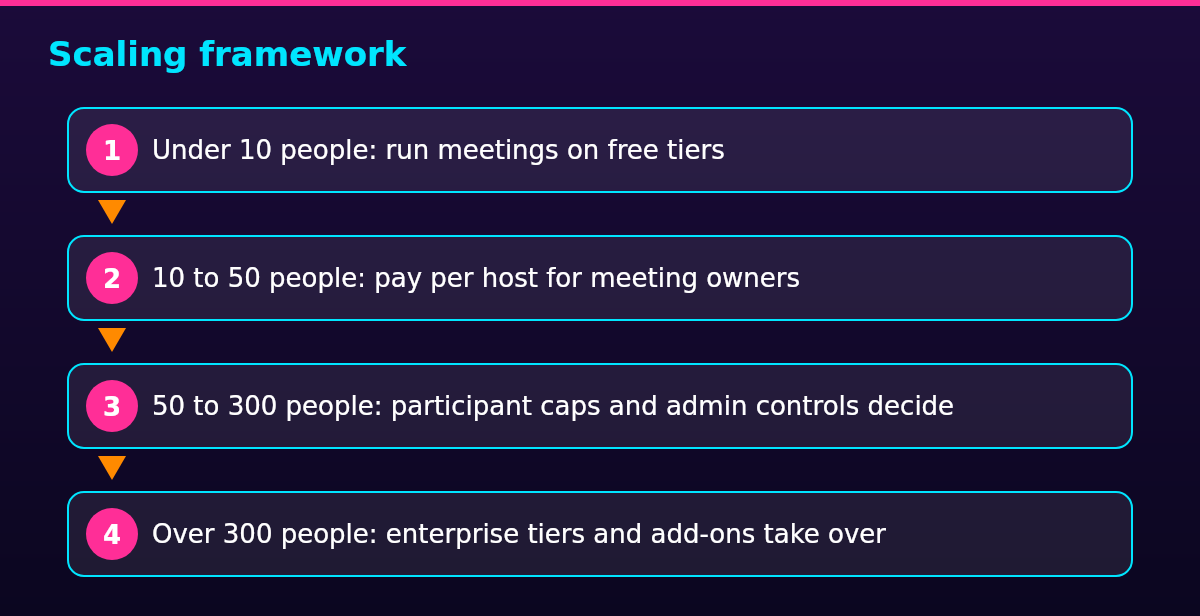
The right Zoom alternative tracks remote team size: free tiers carry a team under 10 people, per-host licenses carry it to 50, participant caps and admin controls decide up to 300, and enterprise tiers take over above that.
- Under 10 people: run meetings on free tiers
- 10 to 50 people: pay per host for meeting owners
- 50 to 300 people: participant caps and admin controls decide
- Over 300 people: enterprise tiers and add-ons take over
At the smallest size, the free tiers decide on their caps: Zoom Basic stops group meetings at 40 minutes, while Jitsi’s and Zoho’s free plans allow longer meetings, with Loom’s Starter plan covering short recorded updates.
From 10 to 50 people, the bill follows the people who run meetings: only they need a paid seat, and everyone else joins free. Zoho Meeting’s Standard plan currently starts at US$1 per host a month billed annually, the cheapest per-host price in this list.
From 50 to 300 people, participant caps and admin controls decide, and the suite the company already owns usually wins: Google Meet’s Standard and Plus plans raise the cap to 150 and then 500 participants, with Teams’ business plans and Webex Meet landing above Zoom Pro’s cap.
Above 300 people, enterprise tiers and add-ons take over, and the question shifts from price to administration: single sign-on (SSO), data residency and audit settings. Zoom’s Large Meeting add-on lifts a meeting to 1,000 participants, and Teams’ E plans and Meet’s enterprise tier sell the same scale.
The tool is one part of the decision: how the team runs its week decides whether those meetings are worth hosting at all, which is the wider job of anyone who has to manage a remote team.
FAQ
The tool the team already pays for usually wins: Microsoft Teams or Google Meet if it runs Microsoft 365 or Google Workspace, Cisco Webex where admin and security controls decide, Zoho Meeting or Jitsi Meet when price leads, and Loom when the meeting should be a recording instead of a live call.
Microsoft Teams is Zoom’s biggest competitor: it ships inside the Microsoft 365 subscriptions many companies already pay for. This comparison ranks the alternatives on fit for a distributed team rather than on market share.
Yes, Zoom remains one of the most widely used meeting platforms, and nothing in this comparison rests on Zoom stopping working. The alternatives above win on price, bundling, admin controls or data control.
Yes: Jitsi Meet is free and open source, and Zoho Meeting’s Standard plan starts at US$1 per host a month billed annually. The suite tools cost nothing extra if the company already pays for Microsoft 365 or Google Workspace, and every free tier trades caps for the price.
You do not bypass it: the cap is Zoom’s own limit on free group meetings, and the honest options are a paid plan, restarting the meeting as a new session, or moving that meeting to a tool without the cap. Zoom Pro lifts group meetings to 30 hours at $14.16 per user a month billed annually.
The free route is a tool without that cap: Jitsi Meet publishes no meeting time limit, and Zoho’s free tier allows longer meetings than Zoom Basic.
Yes, Zoho Meeting has a free plan that allows up to 100 participants and meetings up to 60 minutes, and its paid Standard plan starts at US$1 per host a month billed annually, tiered by participant count. The free plan is the comparison point for Zoom Basic’s 40-minute cap: longer meetings, the same participant count.