

On this page
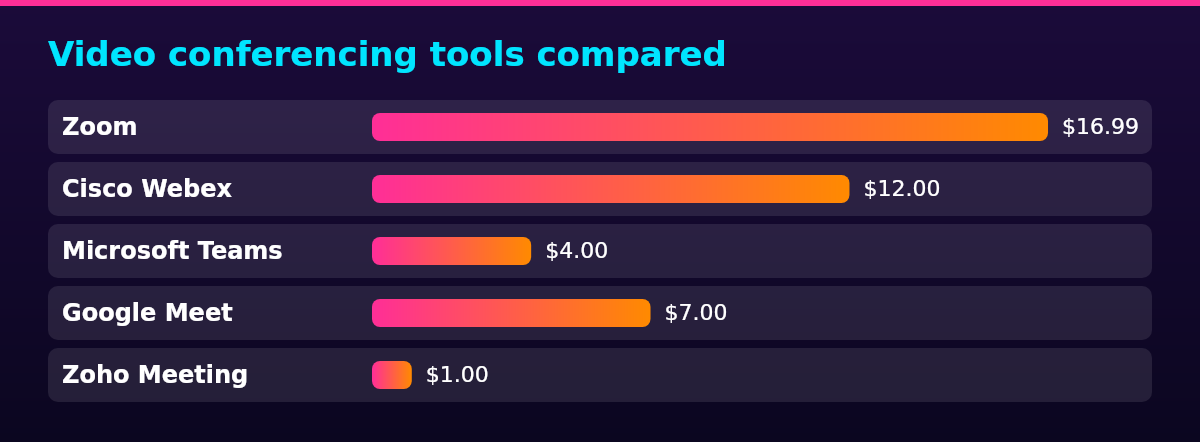
Video conferencing software for a remote team ranges from free to $16.99 per host a month at list price, and the best video conferencing software for a distributed team depends on what you already pay for: Zoom for dedicated external meetings and large calls, Cisco Webex for security-conscious and regulated teams, Microsoft Teams or Google Meet when you already license that office suite, and Zoho Meeting or Jitsi Meet for the lowest bill and the strongest data control. Six video meeting tools are compared on price per host, participant caps, meeting time limits, recording and legal fit, with every price read from the vendor’s own pricing page. Virtual meeting software is billed per host rather than per attendee, so a distributed team of 20 people pays only for the 10 who schedule and run meetings. Zoom’s free tier caps group meetings at 40 minutes, Google Meet caps group calls at one hour, and the free Teams tier stops at 60 minutes.
That range reflects each vendor’s published billing term: Zoom Pro’s $16.99 is its monthly rate, $14.16 billed annually, and Webex, Teams, Google Meet and Zoho publish their list prices at annual billing.
Video conferencing tools compared
| Tool | Best for | Starting price (USD per host a month) | Participants | Meeting limit |
|---|---|---|---|---|
| Zoom | External and large meetings on a dedicated platform | $16.99 | 100 on Pro, 300 on Business | 30 hours on Pro |
| Cisco Webex | Security-conscious and regulated teams | $12.00 | 200 on Meet | 24 hours on Meet |
| Microsoft Teams | Companies already paying for Microsoft 365 | $4.00 | 300 on Essentials | 30 hours on Essentials |
| Google Meet | Teams already on Google Workspace | $7.00 | 100 on Starter, 150 on Standard | 24 hours on all plans |
| Zoho Meeting | Recording and webinars for a few dollars a host | $1.00 | 100 on the free plan, tiered on paid plans | 24 hours on paid plans |
| Jitsi Meet | Full data control without a subscription | $0 | No published cap | 95 minutes on meet.jit.si |
Prices are per host a month: on every tool here you license the people who schedule and run meetings, not the people who attend. Participant caps and meeting limits are for each tool’s cheapest paid plan unless the cell names another tier, and each entry links the vendor’s own pricing page for the figures it cites.
Standalone meeting platforms
For large meetings on a standalone video meeting platform, Zoom and Cisco Webex are the two worth a line item of their own: the 24 to 30 hour meeting limits on their paid plans cover any working day, and each sells meeting-specific add-ons like large-meeting capacity and real-time translation rather than bundling them into a suite. The picks differ on what they lead with: Zoom on familiarity and breadth, Webex on compliance depth.
Zoom
Best for: external and large meetings on a dedicated platform
Zoom is the dedicated meeting platform most teams land on for external and large calls: 100 participants on Pro rising to 300 on Business, 30-hour meetings on paid plans, and 10 GB of cloud recording per license. The same familiarity makes it a common pick for hybrid meetings, where some participants join from a conference room and others from home.
Pro currently runs at $16.99 per host a month on monthly billing or $14.16 billed annually, and Business at $21.99 monthly or $18.33 annually, per the Zoom pricing page. The free Basic tier caps group meetings at 40 minutes with 100 participants and local recording only.
Pros
- 30-hour meetings on every paid plan
- 100 participants on Pro, 300 on Business, 1,000 with the Large Meeting add-on
- 10 GB of cloud recording per license, unlimited on Enterprise
Cons
- Free group meetings stop at 40 minutes
- Large Meeting, webinar and AI add-ons cost extra on top of the per-host license
- Cloud recording storage is metered per license, so it adds up as hosts grow
Cisco Webex
Best for: security-conscious and regulated teams
Cisco Webex suits the teams with the strictest security requirements: its Enterprise tier lists FedRAMP-authorized security and unlimited cloud recording, and the Meet license carries 24-hour meetings with up to 200 attendees, closed captions and Slido polling inside the standard price.
Webex Meet currently costs $12 per license a month billed annually, $144 a year, and the Suite license that adds business calling is $22.50, per Cisco’s pricing page. The page currently shows a buy five or more, get six months free offer on Meet licenses, and the free tier runs 40-minute meetings with up to 100 attendees.
Pros
- 24-hour meetings and 200 attendees on the Meet license
- 10 GB of AI-powered cloud recording with closed captions included
- Enterprise tier carries 1,000 attendees and FedRAMP-authorized security
Cons
- Licenses are billed annually, with no published monthly rate
- Meet stops at 200 attendees, so larger events need Enterprise or a webinar plan
- The Real-Time Translation add-on costs $300 per license a year
Meetings inside your office suite
Between Microsoft Teams and Google Meet for video meetings, the better tool is the suite you already pay for: both come inside the same per-user license as your documents and email, both run meetings well past a working day, and neither adds a new line item to the bill. Scheduled meetings across time zones cluster inside your team’s core hours, so the tool attached to the calendar people already use is the one that gets adopted.
Microsoft Teams
Best for: companies already paying for Microsoft 365
Microsoft Teams turns the suite most companies already license into the meeting platform: the Essentials plan carries meetings up to 30 hours with up to 300 participants, plus recording, transcripts, live captions and 10 GB of cloud storage per user.
Essentials currently costs $4 per user a month billed yearly, Microsoft 365 Business Basic at $7 bundles Teams with the web and mobile Office apps, and the Teams Premium add-on runs $10, per the Microsoft Teams plans page. The free personal tier caps group calls at 60 minutes, with no time limit on one-on-one calls.
Microsoft’s limits and specifications page sets the 300-participant ceiling across Business Basic, Business Standard, Business Premium and Essentials licenses, rising to 1,000 on E3 and E5 enterprise plans, and caps Teams meetings and events at 30 hours.
Pros
- 30-hour meetings and 300 participants on a $4 plan
- Recording, transcripts and live captions included
- 10 GB of cloud storage per user on Essentials
Cons
- Its value depends on already paying for the Microsoft 365 stack
- The free personal tier caps group calls at 60 minutes
- Premium features cost the $10 per user a month add-on
Google Meet
Best for: teams already on Google Workspace
Google Meet lives inside Google Workspace, where the license you already pay for documents and email carries the meetings too: every plan caps meetings at 24 hours, with 100 participants on Starter, 150 on Standard and 500 on Plus.
Business Starter currently costs $7 per user a month with annual commitment, Standard is $14 and Plus is $22, per the Google Workspace pricing page, and Starter through Plus are capped at 300 users per organization. Recording is absent on Starter and included on Standard and above, saved to Google Drive.
Free personal accounts can start and join meetings, capped at one hour for calls with three or more participants and 24 hours for one-on-one calls, per Google’s Meet support page.
Pros
- 24-hour meetings on every plan
- Recording saved to Google Drive on Standard and above
- Participant caps scale to 500 on Plus and 1,000 on Enterprise
Cons
- No standalone meeting pricing outside Workspace, so it comes with the suite or not at all
- Starter lacks recording, the feature most teams record meetings for
- The business plans cap at 300 users per organization
Low-cost options
The cheapest video conferencing software for a small team takes two routes: a cheap host license from a smaller vendor, or self-hosting an open source platform where the only cost is the servers you run it on. Zoho Meeting takes the first route down to a dollar a host, and Jitsi Meet takes the second to zero.
Zoho Meeting
Best for: small teams that need recording and webinars for a few dollars a host
Zoho Meeting prices by participant tier rather than a flat per-host rate, which makes it the cheapest paid option on this list: paid plans run meetings up to 24 hours with 5 GB of cloud recording per host, and the free plan carries 60-minute meetings with up to 100 participants.
Meeting Standard currently starts at $1 per host a month billed annually and tops out at $10, and Meeting Professional runs $3 to $15 while adding breakout rooms, recording transcripts and API access, per the Zoho Meeting pricing page. Annual billing is the headline rate and monthly billing costs more, and toll-free dial-in numbers cost $192 a year per organization.
Pros
- The lowest entry price on the list, from $1 per host a month
- 24-hour meetings and 5 GB of cloud recording per host on paid plans
- Breakout rooms, transcripts and API access on Professional
- Free plan with 100 participants and 60-minute meetings
Cons
- Participant caps and price move together, so bigger meetings cost more per host
- The headline prices require annual billing
- Toll-free dial-in numbers are a $192 a year add-on per organization
Jitsi Meet
Best for: teams that want full data control without a subscription
Jitsi Meet is completely free video conferencing you can run on your own servers, which makes it the strongest data-control option on this list: there is no vendor account, no per-host license and no bill, only the servers you choose to run it on.
Jitsi’s own documentation describes the platform as a set of open source projects you deploy with Debian packages or a Docker setup, or use free at the public meet.jit.si instance, so self-hosting keeps the meeting media inside your infrastructure.
The price is $0 at any team size, per Jitsi’s own site, and there is no paid plan to upgrade into. One limit to know: meetings on the public meet.jit.si service are currently limited to 95 minutes under a change announced on the site in October 2026, while a self-hosted deployment has no published cap.
Pros
- No license cost at any team size
- Meeting media stays on your own servers when self-hosted
- No published participant or time limit when self-hosted
Cons
- Self-hosting means you run, secure and update the servers
- The public meet.jit.si service limits meetings to 95 minutes
- Thinner admin, recording and compliance tooling than the commercial platforms
Cost comparison
| Tool | Plan used | Price per host a month (USD) | Monthly total for 10 hosts (USD) |
|---|---|---|---|
| Zoom | Pro | $16.99 | $169.90 |
| Cisco Webex | Meet | $12.00 | $120.00 |
| Microsoft Teams | Essentials | $4.00 | $40.00 |
| Google Meet | Business Starter | $7.00 | $70.00 |
| Zoho Meeting | Standard | $1 to $10 | $10 to $100 |
| Jitsi Meet | Self-hosted | $0 | $0 |
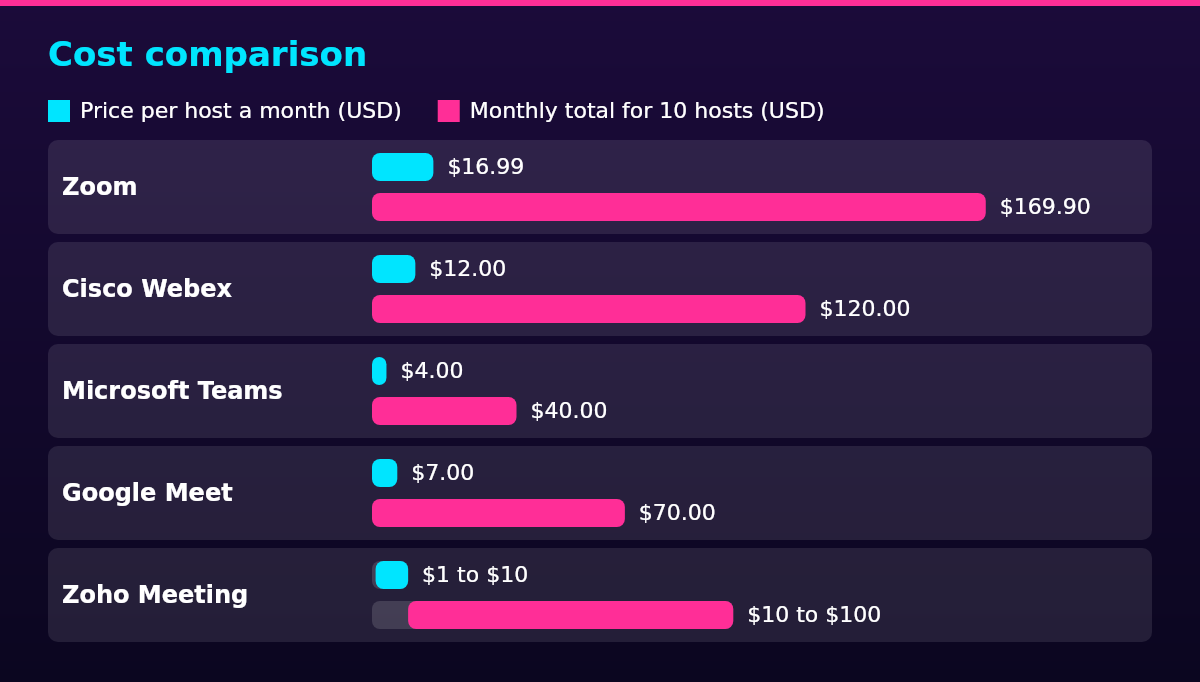
Take a 20-person team where 10 people host meetings. Ten Zoom Pro hosts at $16.99 is $169.90 a month, ten Webex Meet hosts at $12 is $120, ten Teams Essentials hosts at $4 is $40, ten Business Starter hosts at $7 is $70, and ten Zoho Meeting Standard hosts at $1 to $10 is $10 to $100 depending on the participant tier. Jitsi Meet adds nothing to the bill.
Hosts decide the bill, not attendees: participants cost nothing on every tool here, so the same licenses cover a large all-hands as long as the plan’s participant cap allows it. The suite crossover is the biggest saving on the table: teams already paying for Microsoft 365 or Google Workspace get Teams or Meet with no new line item, which is why the suite tools win most renewals.
Add-ons move real bills at the top end:
- Zoom’s Large Meeting add-on extends meetings to 1,000 participants, and Zoom’s pricing page lists it without printing a price
- Webex Real-Time Translation currently costs $300 per license a year, per Cisco’s pricing page
- Zoho’s toll-free numbers currently cost $192 a year per organization, per the Zoho Meeting pricing page
- Teams Premium currently runs $10 per user a month billed yearly, per the Microsoft Teams plans page
Legal compliance
Recording video meetings is legal under US federal law with one party’s consent: interception is lawful when one of the parties to the communication has given prior consent, under 18 U.S.C. § 2511. Some states go further and require all parties, which is the rule that changes which tool fits.
In Illinois, recording a private conversation without the consent of all of the parties is the crime of eavesdropping, under 720 ILCS 5/14-2.
Florida’s wiretap statute permits interception only when all of the parties have given prior consent, under section 934.03.
The practical rule for a distributed team: before anyone hits record, check the strictest state represented on the call, because a recording made under one-party rules can still break an all-party state’s law for a participant dialed in from there. Recording meetings also sits next to the wider employee monitoring laws that apply when staff work from home, which deserve a policy of their own.
When EU or EEA team members’ data flows through the tool, the vendor acts as a processor, the entity that handles personal data on your instructions, under the General Data Protection Regulation (GDPR). The employer is the controller and must use only processors that implement appropriate technical and organizational measures, bound by a written processor contract covering what is processed, how and for how long, under Article 28 of Regulation (EU) 2016/679. A recorded meeting with identifiable voices and faces is personal data, so recording belongs in that contract.
Self-hosting is the strongest position on data control: a self-hosted Jitsi deployment keeps the meeting media on servers you control, so no vendor processor is involved at all.
Scaling framework
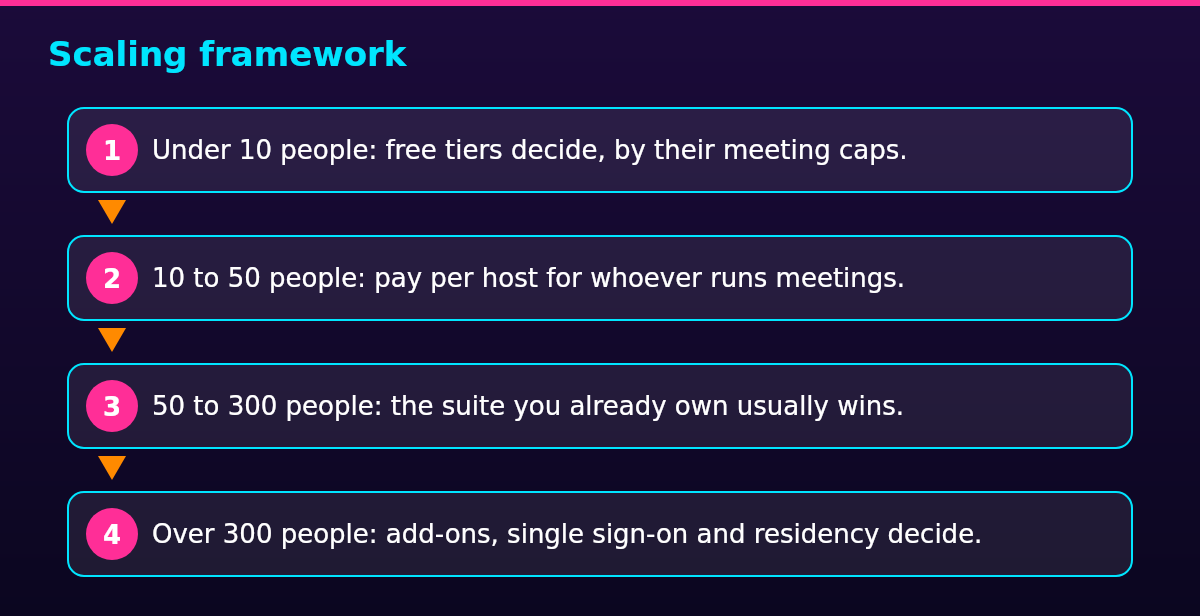
For remote teams, the video conferencing choice runs in four stages of headcount, and above 300 people the large-meeting add-ons and enterprise tiers decide.
- Under 10 people: free tiers decide, by their meeting caps.
- 10 to 50 people: pay per host for whoever runs meetings.
- 50 to 300 people: the suite you already own usually wins.
- Over 300 people: add-ons, single sign-on and residency decide.
At under 10 people, the free tiers carry most teams: Zoom Basic caps group meetings at 40 minutes with 100 participants, the free Webex tier runs 40-minute meetings with 100 attendees, Zoho’s free plan allows 60-minute meetings with 100 participants, and the free personal Teams tier caps group calls at 60 minutes. Jitsi costs nothing at any size.
From 10 to 50 people, the per-host model starts to matter: a 20-person team with 10 hosts pays $40 to $169.90 a month across the paid tools compared above, and recording with transcripts starts to be worth paying for, because onboarding sessions and all-hands replays depend on it.
From 50 to 300 people, participant caps and admin controls decide: Teams and Zoom both carry 300-participant meetings on business plans, Webex Meet stops at 200 attendees, and Google Meet’s Standard plan carries 150, so the suite you already own usually wins on cost alone.
Above 300 people, the large-meeting add-ons and enterprise tiers take over: Zoom’s Large Meeting add-on and Enterprise tier carry 1,000 participants, Webex Enterprise lists 1,000 attendees, and Meet’s Enterprise plan carries 1,000, so data residency and single sign-on become the deciding features.
Tools do not run the meeting, though: managing a remote team well matters more to a call’s quality than the platform’s brand, and virtual meeting etiquette decides whether the time was worth scheduling. Pick the tool in an afternoon, then spend the saved time on those two.
FAQ
Zoom and Microsoft Teams are the two names most teams land on: Zoom as the dedicated meeting platform people reach for external calls, Teams as the meeting tool inside the Microsoft 365 licenses many companies already hold. Google Meet plays the same role for Google Workspace teams. Popularity is a starting point, not a verdict, and the fit questions are price per host, participant caps and the suite you already own.
Yes, both have free tiers. Zoom’s Basic plan runs group meetings up to 40 minutes with 100 participants and local recording only; Google Meet is free with a personal Google account, and meetings with three or more participants are capped at one hour, with 24 hours for one-on-one calls. The paid plans lift those caps.
No, neither is better outright; the answer is the suite you already pay for. A company on Microsoft 365 gets 30-hour meetings, 300 participants, recording and transcripts on the $4 Essentials plan, which makes Teams the cheaper line item, while a team without a Microsoft 365 subscription gets more standalone value from Zoom’s per-host licenses.
Microsoft Teams, because it reaches the same buyers through the suite: Teams arrives bundled with the Microsoft 365 licenses many companies already hold, so it competes with Zoom’s dedicated per-host licenses at no extra cost for anyone in that ecosystem. Among the standalone platforms, Cisco Webex is the closest like-for-like rival.
Anywhere from $0 to $16.99 per host a month at list price, before add-ons. Jitsi Meet is free, Zoho Meeting starts at $1 a host billed annually, Teams Essentials costs $4 billed yearly, Google Meet’s Business Starter runs $7 with annual commitment, Webex Meet costs $12 billed annually, and Zoom Pro tops the range at $16.99 at monthly billing. For a 20-person team with 10 hosts, that is a $0 to $169.90 monthly bill, and suite subscribers on Microsoft 365 or Google Workspace often pay nothing extra at all.
A laptop with a working camera, a headset with a microphone, and a browser or the meeting app is the whole baseline for a professional call. Better audio beats better video, because a headset removes the room echo that makes people talk over each other.
Yes: it is bundled into every major office suite, and distributed teams still run scheduled calls as the backbone of a remote week. What changed is that the standalone platform now competes with the suite copy most companies already pay for.